Convex: The Only Backend You Need (Restaurant Kitchen Analogy)
A practical guide to Convex's reactive backend, explained like a restaurant kitchen where every table sees updates in real-time.

Imagine a restaurant where every table can see the kitchen in real-time. The moment a chef finishes a dish, it appears on every screen. No waiter runs back and forth. No "let me check on that for you." The kitchen and the dining room are always in sync.
That's Convex.
Why Another Backend?
You've built backends before. You've set up Express servers, connected to Postgres, written SQL queries, configured WebSocket servers for real-time updates, managed connection pools, dealt with race conditions, and spent weekends debugging why your cache went stale.
And every time you start a new project, you do it all over again.
Convex asks a different question: what if your backend was just TypeScript functions that automatically stayed in sync with your frontend?
No SQL. No ORM. No WebSocket setup. No manual cache invalidation. No REST endpoints. You write a function, your React component subscribes to it, and when the data changes, the UI updates. Automatically.
If that sounds too good to be true, let's build something and see.
The Restaurant Analogy
Before we write any code, let's understand how Convex works through a restaurant.
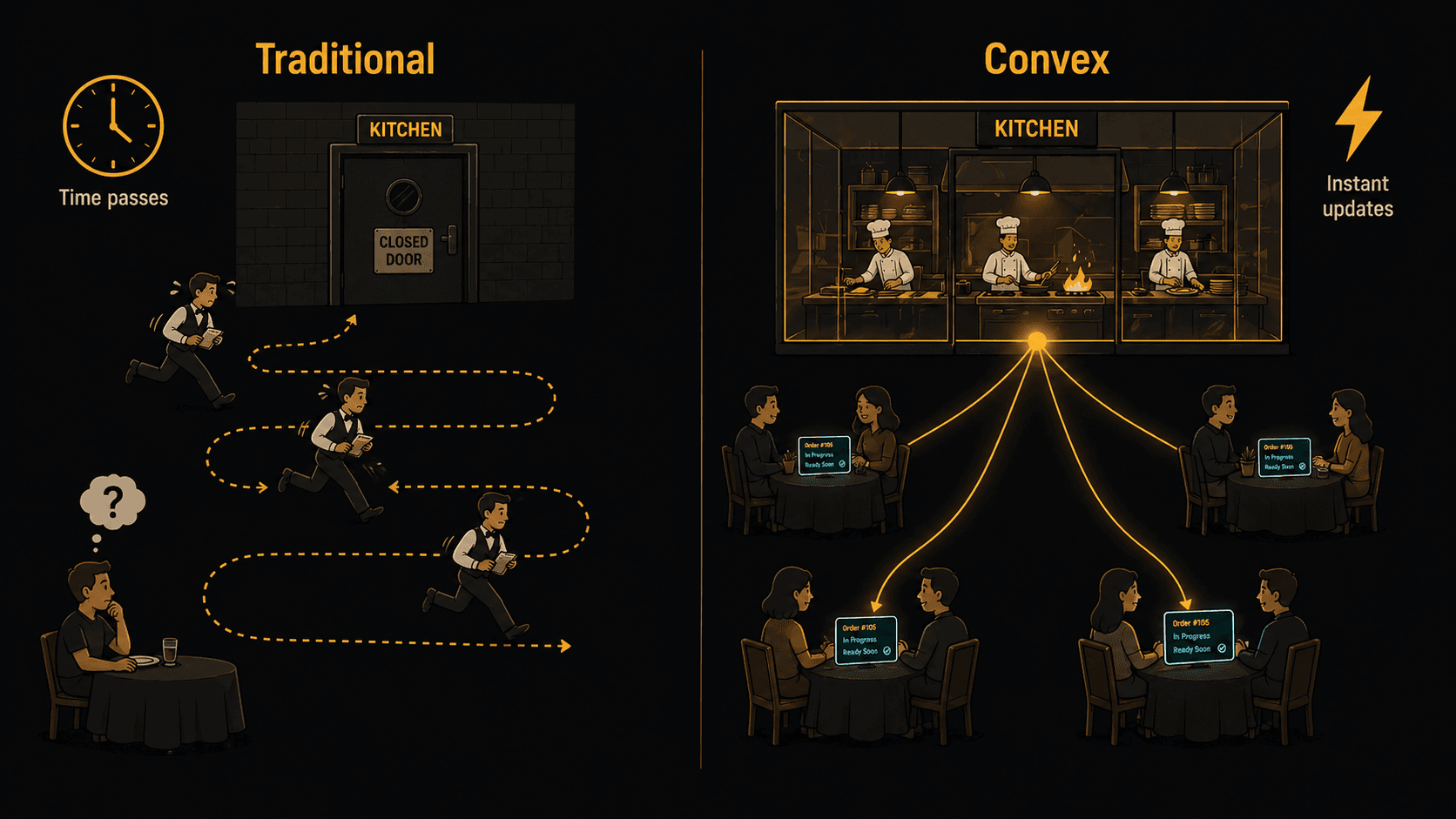
The Traditional Restaurant (Traditional Backend)
In a traditional restaurant:
- A customer (the frontend) wants to know what's available
- They call a waiter (API request) who walks to the kitchen (server)
- The waiter checks the menu board (database query)
- The waiter walks back and tells the customer (API response)
- If the menu changes, nobody knows until someone asks again
This is how most apps work. Your frontend makes a fetch request. The server queries the database. The response comes back. If the data changes a second later, your UI is already stale. You need to poll, or set up WebSockets, or add a caching layer with invalidation logic.
The Convex Restaurant (Reactive Backend)
In the Convex restaurant, things work differently:
- Every table has a live screen showing the kitchen (reactive subscription)
- When a customer places an order (mutation), it goes straight to the kitchen
- The kitchen processes the order (transaction)
- Every screen in the restaurant updates instantly (reactive query)
- If the daily special changes, every table sees it immediately. Nobody asked. Nobody polled. It just happened.
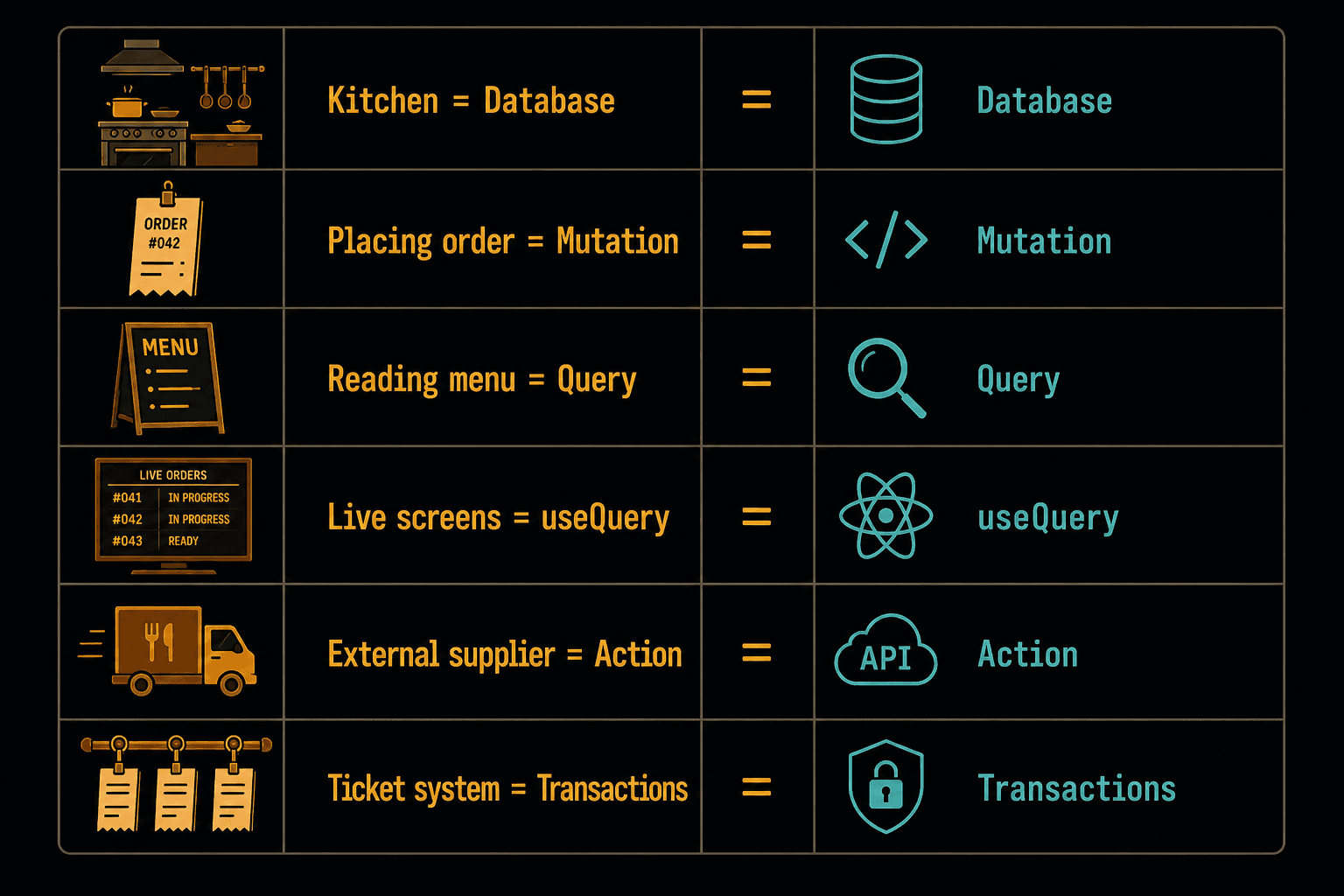
The key roles map directly to Convex concepts:
- The Kitchen = Convex Database (where data lives)
- Placing an order = Mutation (writing data)
- Reading the menu = Query (reading data)
- The live screens =
useQuerysubscriptions (real-time UI updates) - Calling an external supplier = Action (external API calls like OpenAI, Stripe)
- The kitchen ticket system = Transactions (every mutation is atomic, consistent)
Let's build the restaurant.
Step 1: Setting Up the Kitchen
First, create a Next.js app and install Convex:
npx create-next-app@latest convex-restaurant --ts
cd convex-restaurant
npm install convex
Now set up your Convex development environment:
npx convex dev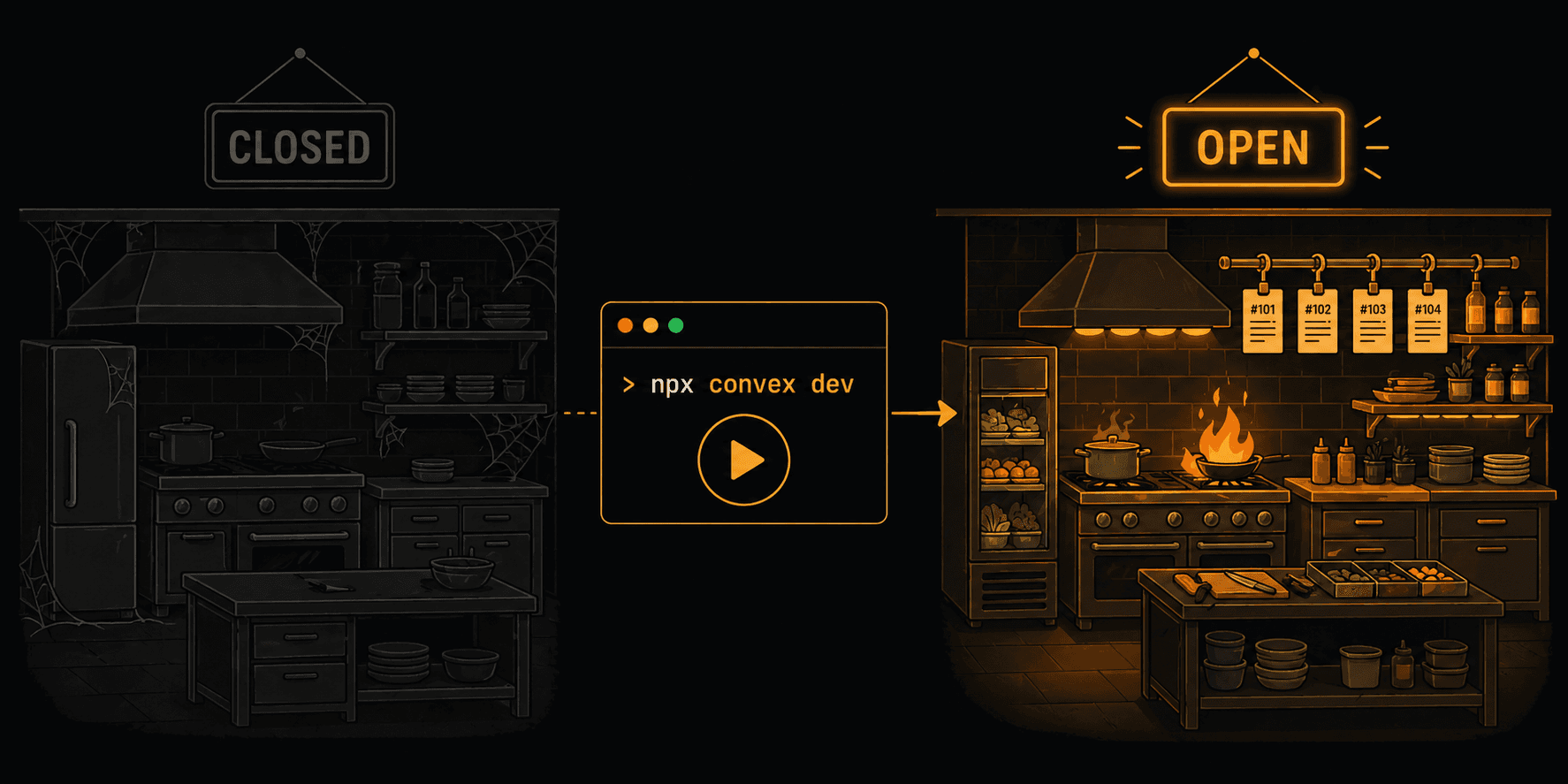
This does three things: creates a convex/ folder for your backend code, provisions a cloud database, and starts syncing your functions in real-time. Every time you save a file in the convex/ folder, it deploys instantly. No build step. No deploy command.
Think of npx convex dev as opening the kitchen for service. It's running, it's listening, and it's ready to serve.
Step 2: Defining the Menu (Database Schema)
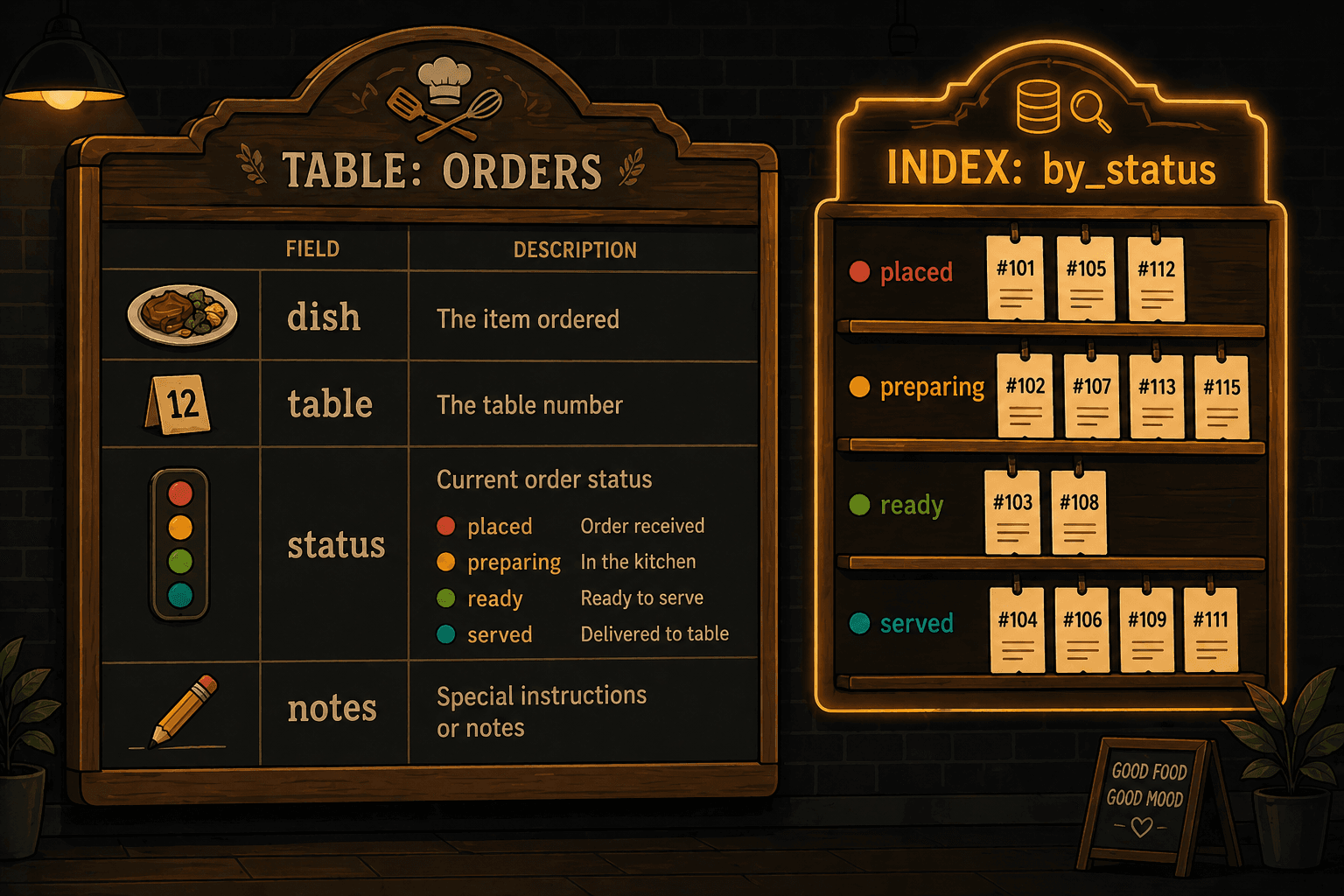
In Convex, you can define your database schema in a convex/schema.ts file. This gives you full TypeScript type safety across your entire stack.
// convex/schema.ts
import { defineSchema, defineTable } from "convex/server";
import { v } from "convex/values";

export default defineSchema({
  orders: defineTable({
    dish: v.string(),
    table: v.number(),
    status: v.union(
      v.literal("placed"),
      v.literal("preparing"),
      v.literal("ready"),
      v.literal("served")
    ),
    notes: v.optional(v.string()),
    createdAt: v.number(),
  }).index("by_status", ["status"]),
});
Notice something? This isn't SQL. It's TypeScript. You define tables and their fields using Convex's validator (v). The schema is the source of truth, and every function you write gets full type checking against it.
The .index("by_status", ["status"]) line creates a database index. In our restaurant analogy, it's like having a separate rail in the kitchen for each order status: one rail for "placed," one for "preparing," one for "ready." Instead of searching through every ticket, the kitchen can instantly grab all orders of a certain status.
Step 3: Taking Orders (Mutations)
Mutations are how you write data. In our restaurant, placing an order is a mutation.
// convex/orders.ts
import { mutation } from "./_generated/server";
import { v } from "convex/values";

export const placeOrder = mutation({
  args: {
    dish: v.string(),
    table: v.number(),
    notes: v.optional(v.string()),
  },
  handler: async (ctx, args) => {
    const orderId = await ctx.db.insert("orders", {
      dish: args.dish,
      table: args.table,
      status: "placed",
      notes: args.notes,
      createdAt: Date.now(),
    });
    return orderId;
  },
});

export const updateStatus = mutation({
  args: {
    orderId: v.id("orders"),
    status: v.union(
      v.literal("placed"),
      v.literal("preparing"),
      v.literal("ready"),
      v.literal("served")
    ),
  },
  handler: async (ctx, args) => {
    await ctx.db.patch(args.orderId, { status: args.status });
  },
});
Two things to notice here:
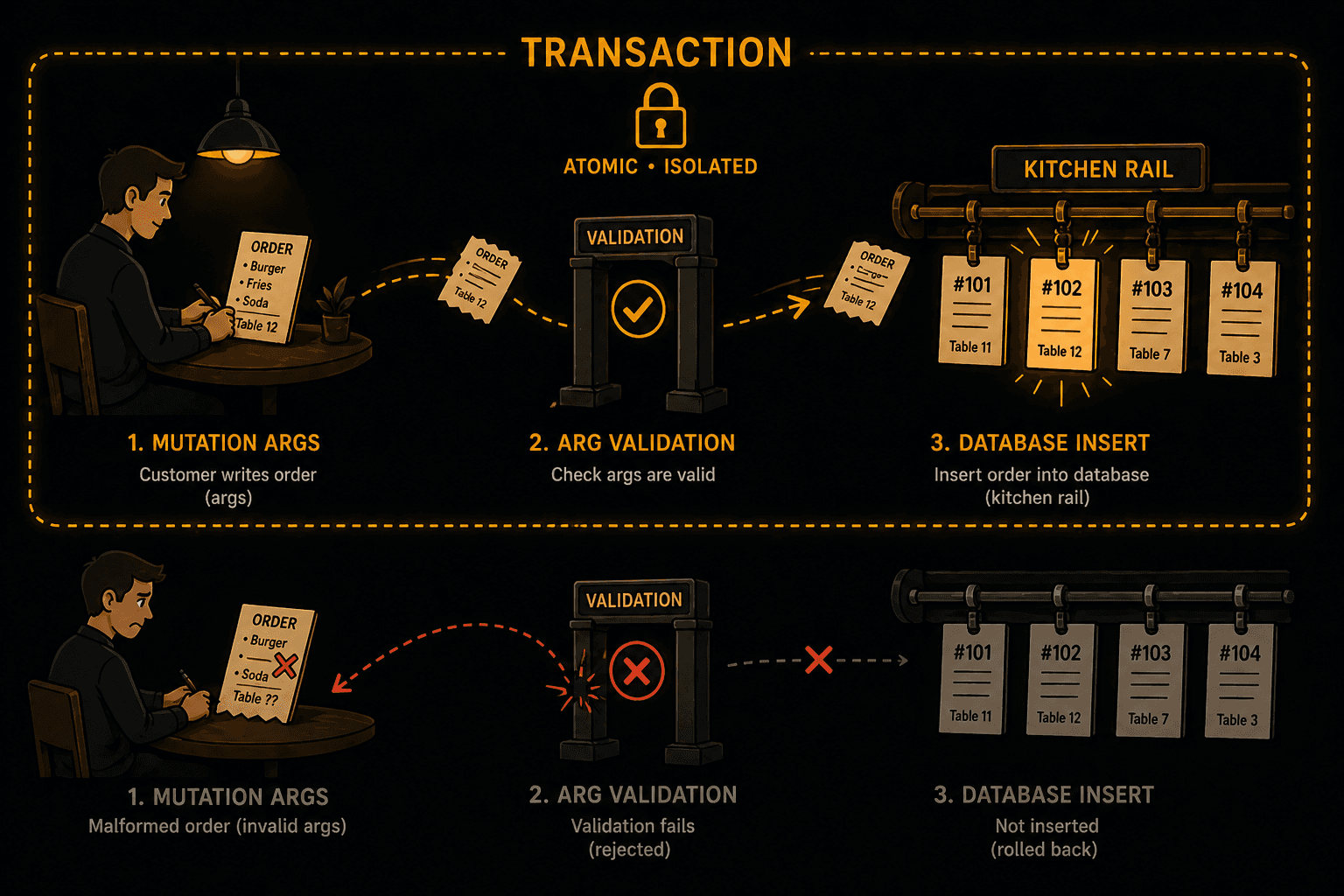
Argument validation is built in. The args object defines exactly what the function accepts, with types. If someone tries to call placeOrder with a number for dish, Convex rejects it before your code runs. No Zod. No Joi. No middleware. It's baked into the framework.
The entire function is a transaction. When placeOrder runs, the insert either succeeds completely or fails completely. There's no beginTransaction() or commit(). Convex handles it. If two customers place an order at the exact same millisecond, Convex serializes them. No race conditions. No corrupted data. Ever.
In kitchen terms: a ticket either gets hung on the rail or it doesn't. There's no half-hung ticket.
Step 4: Reading the Menu Board (Queries)
Queries are how you read data. In our restaurant, checking the order status is a query.
// convex/orders.ts (add to the same file)
import { query } from "./_generated/server";

export const getActiveOrders = query({
  args: {},
  handler: async (ctx) => {
    const orders = await ctx.db
      .query("orders")
      .withIndex("by_status", (q) => q.neq("status", "served"))
      .order("asc")
      .collect();
    return orders;
  },
});

export const getOrdersByTable = query({
  args: { table: v.number() },
  handler: async (ctx, args) => {
    const orders = await ctx.db
      .query("orders")
      .filter((q) => q.eq(q.field("table"), args.table))
      .order("desc")
      .collect();
    return orders;
  },
});
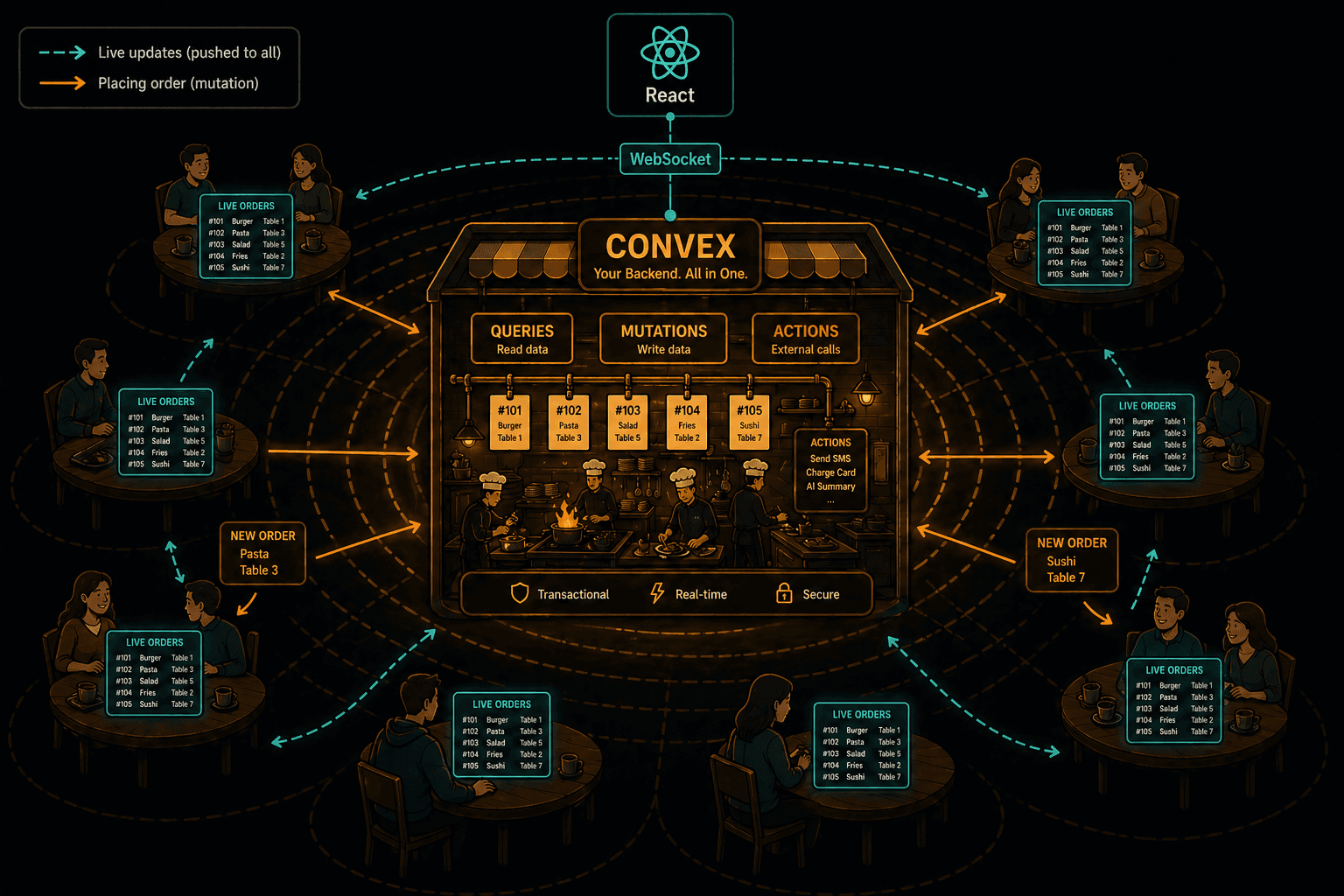
Here's the part that matters: queries in Convex are reactive by default. When you subscribe to getActiveOrders from your frontend, Convex tracks which database rows the query read. When any of those rows change (because a mutation ran), Convex automatically reruns the query and pushes the new result to your frontend.
You don't set up WebSockets. You don't write a subscription handler. You don't invalidate a cache. You just write a function that reads data, and Convex makes it real-time.
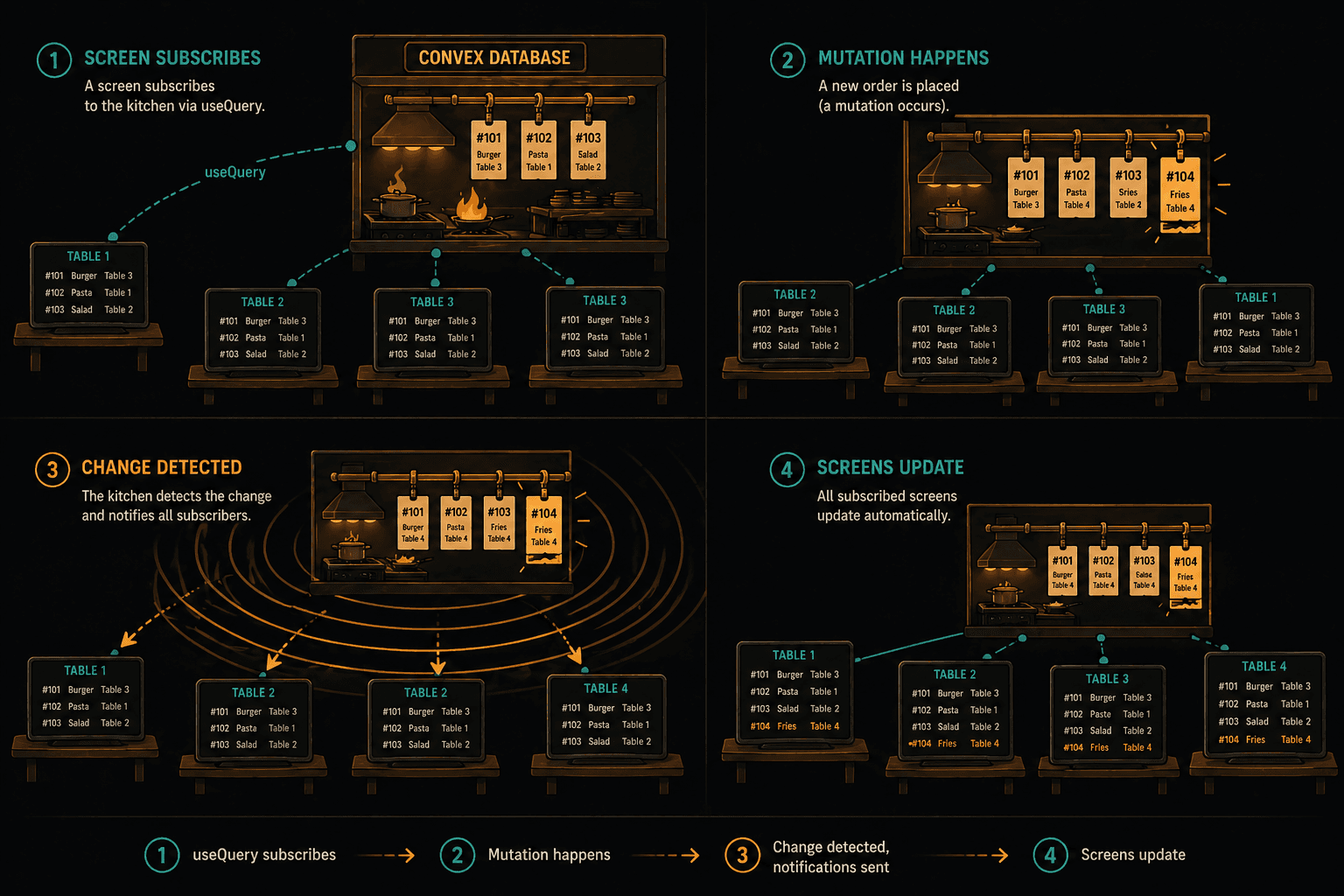
Back to the restaurant: the live screen on every table isn't polling the kitchen every 5 seconds asking "any updates?" Instead, the kitchen pushes updates to every screen the moment something changes. That's Convex reactivity.
Step 5: Wiring Up the Dining Room (React Frontend)
First, set up the Convex provider in your app. This is like installing the live screens in the dining room.
// app/ConvexClientProvider.tsx
"use client";

import { ConvexProvider, ConvexReactClient } from "convex/react";
import { ReactNode } from "react";

const convex = new ConvexReactClient(process.env.NEXT_PUBLIC_CONVEX_URL!);

export function ConvexClientProvider({ children }: { children: ReactNode }) {
  return <ConvexProvider client={convex}>{children}</ConvexProvider>;
}// app/layout.tsx
import { ConvexClientProvider } from "./ConvexClientProvider";
export default function RootLayout({ children }: { children: React.ReactNode }) {
return (
<html lang="en">
<body>
<ConvexClientProvider>{children}</ConvexClientProvider>
</body>
</html>
);
}Now build the order display. This is where the magic happens:
// app/page.tsx
"use client";

import { useQuery, useMutation } from "convex/react";
import { api } from "../convex/_generated/api";
import { useState } from "react";

export default function Restaurant() {
  const orders = useQuery(api.orders.getActiveOrders);
  const placeOrder = useMutation(api.orders.placeOrder);
  const updateStatus = useMutation(api.orders.updateStatus);

  const [dish, setDish] = useState("");
  const [table, setTable] = useState(1);

  const handleOrder = async () => {
    if (!dish) return;
    await placeOrder({ dish, table });
    setDish("");
  };

  return (
    <main>
      <h1>Restaurant Orders</h1>

      {/* Place a new order */}
      <div>
        <input
          value={dish}
          onChange={(e) => setDish(e.target.value)}
          placeholder="What would you like?"
        />
        <select value={table} onChange={(e) => setTable(Number(e.target.value))}>
          {[1, 2, 3, 4, 5].map((t) => (
            <option key={t} value={t}>Table {t}</option>
          ))}
        </select>
        <button onClick={handleOrder}>Place Order</button>
      </div>

      {/* Live order display */}
      {orders === undefined ? (
        <p>Loading...</p>
      ) : (
        <div>
          {orders.map((order) => (
            <div key={order._id}>
              <span>Table {order.table}: {order.dish}</span>
              <span>Status: {order.status}</span>
              {order.status === "placed" && (
                <button onClick={() => updateStatus({
                  orderId: order._id,
                  status: "preparing"
                })}>
                  Start Preparing
                </button>
              )}
              {order.status === "preparing" && (
                <button onClick={() => updateStatus({
                  orderId: order._id,
                  status: "ready"
                })}>
                  Mark Ready
                </button>
              )}
              {order.status === "ready" && (
                <button onClick={() => updateStatus({
                  orderId: order._id,
                  status: "served"
                })}>
                  Served
                </button>
              )}
            </div>
          ))}
        </div>
      )}
    </main>
  );
}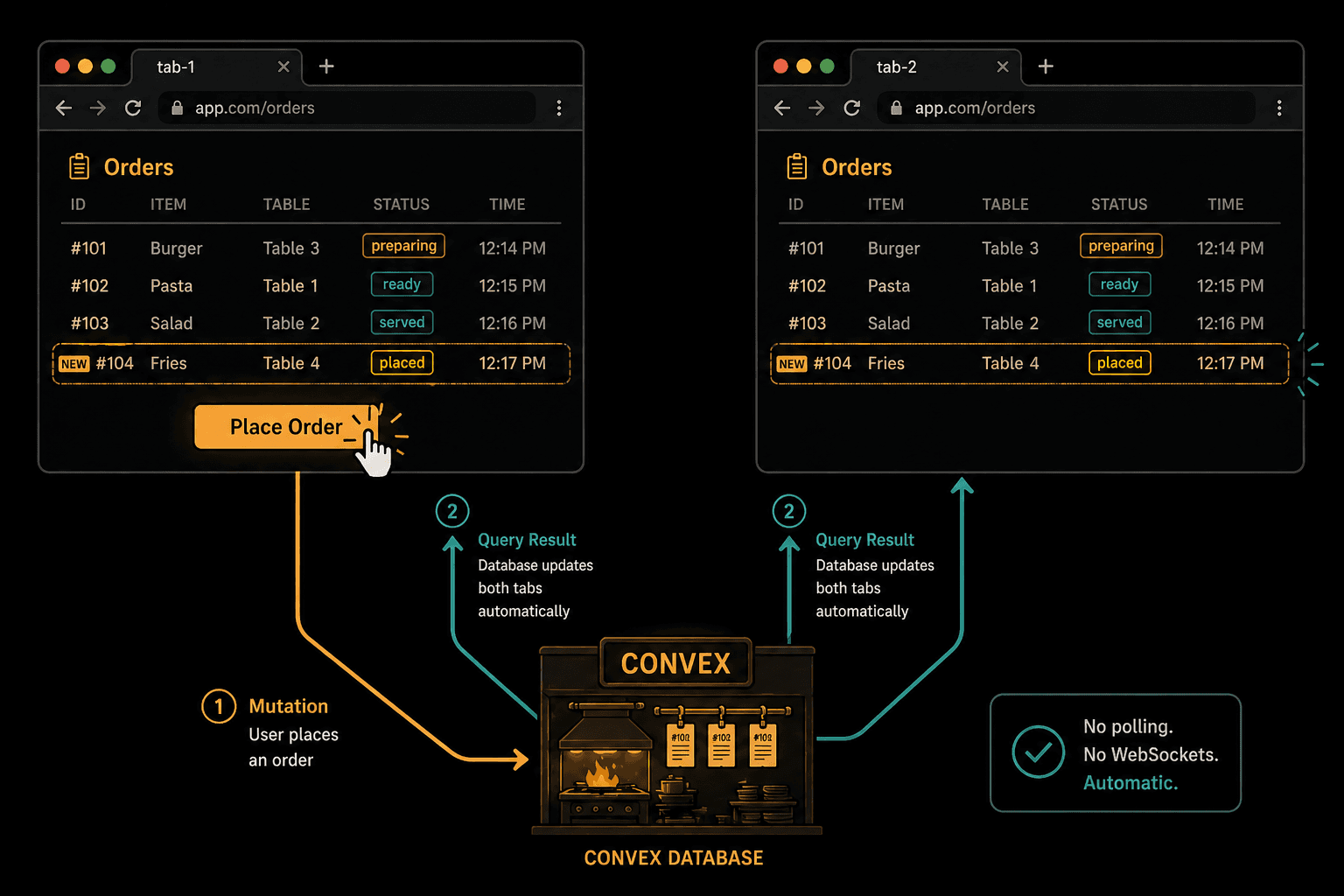
Read through the component. There's no fetch. No useEffect for data loading. No loading state management beyond a simple undefined check. No WebSocket connection code. No cache invalidation.
useQuery(api.orders.getActiveOrders) subscribes to the query. When any order is placed, updated, or served, the component re-renders with the latest data. Open the app in two browser tabs, place an order in one, and watch it appear in the other. Instantly.
That's the live screen in the dining room.
Step 6: Calling External Suppliers (Actions)
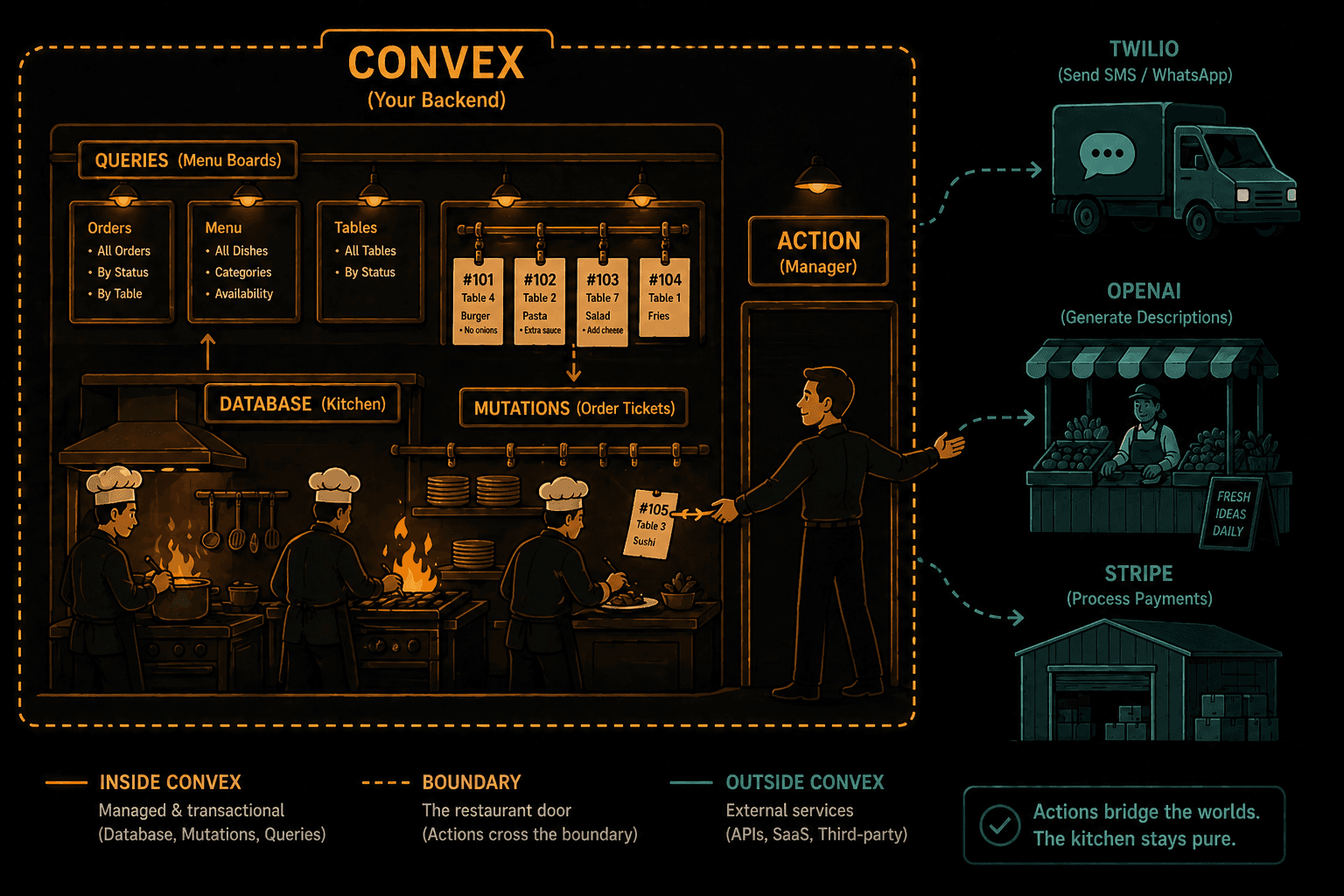
Queries and mutations can only talk to the Convex database. They can't make network requests. This is intentional: it's what makes transactions reliable and queries cacheable.
But sometimes you need to call the outside world. Want to send an SMS when an order is ready? Need to charge a credit card? Want to ask GPT for a dish recommendation? That's what actions are for.
// convex/notifications.ts
import { action } from "./_generated/server";
import { v } from "convex/values";
import { api } from "./_generated/api";

export const notifyOrderReady = action({
  args: { orderId: v.id("orders"), phoneNumber: v.string() },
  handler: async (ctx, args) => {
    // First, read the order details using a query
    const order = await ctx.runQuery(api.orders.getOrderById, {
      orderId: args.orderId,
    });

    if (!order) throw new Error("Order not found");

    // Call an external API (Twilio, SendGrid, etc.)
    await fetch("https://api.twilio.com/send", {
      method: "POST",
      body: JSON.stringify({
        to: args.phoneNumber,
        message: `Your ${order.dish} is ready! Please pick up at the counter.`,
      }),
    });

    // Update the order status via a mutation
    await ctx.runMutation(api.orders.updateStatus, {
      orderId: args.orderId,
      status: "served",
    });
  },
});
Actions can do anything: API calls, file processing, AI requests. But they can't directly read or write the database. They have to call queries and mutations to do that. This separation is the reason Convex can guarantee transactional consistency.
In restaurant terms: the kitchen staff (queries and mutations) handle everything inside the kitchen. If you need to call an external supplier for a special ingredient, the manager (action) makes that call, then hands the ingredient to the kitchen staff to use.
[table]
This separation isn't limiting. It's freeing. You never have to think about whether a database write might fail halfway because of a network call. Mutations are pure database transactions. Actions handle the messy outside world. Queries are always consistent and cacheable.
Why Convex Feels Different
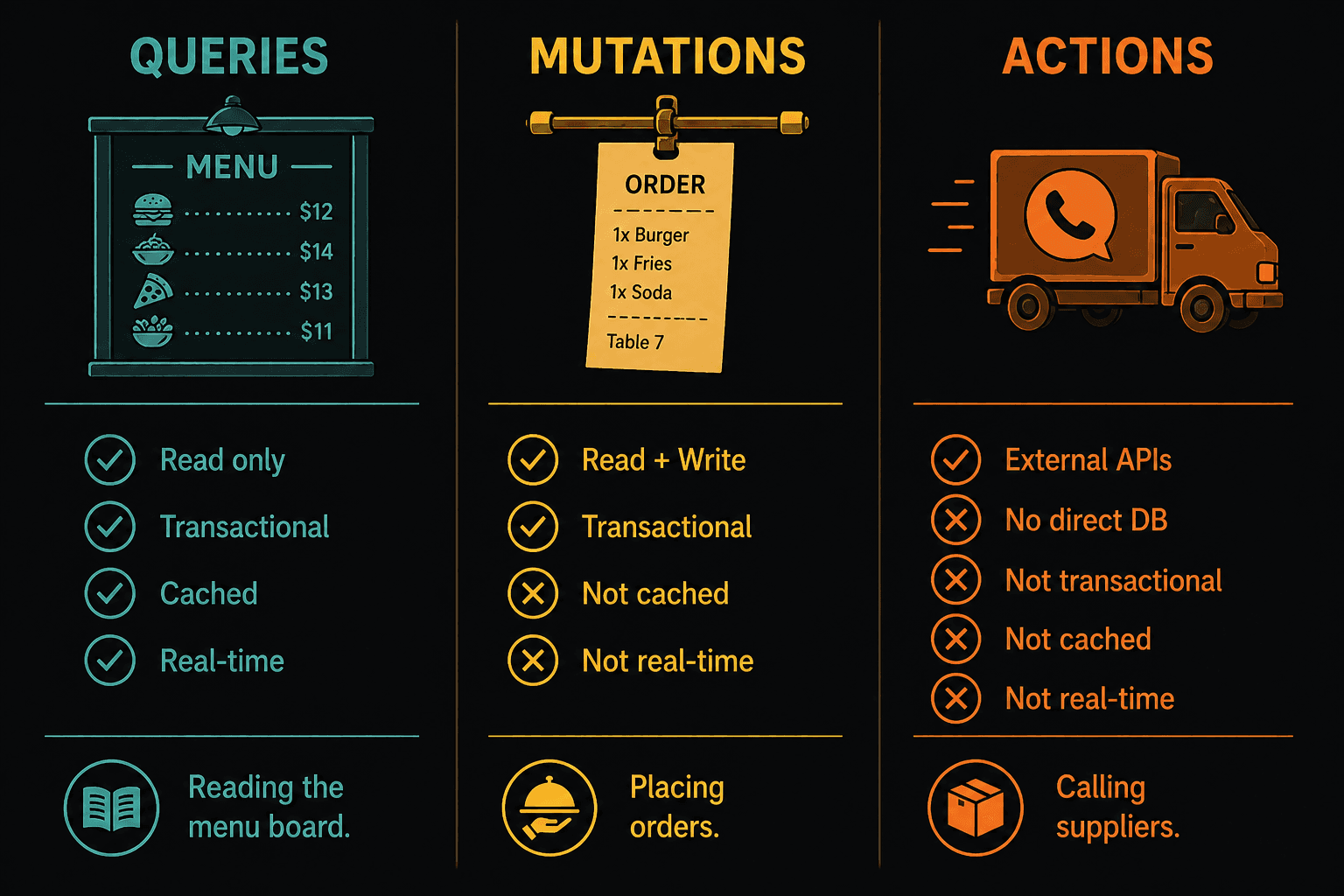
This separation isn't limiting. It's freeing. You never have to think about whether a database write might fail halfway because of a network call. Mutations are pure database transactions. Actions handle the messy outside world. Queries are always consistent and cacheable.
Why Convex Feels Different
After building this, a few things probably stood out:
Zero infrastructure. You didn't set up a database. You didn't configure connection strings. You didn't deploy a server. npx convex dev and you're running.
TypeScript everywhere. Your schema, your server functions, your frontend calls are all TypeScript with end-to-end type safety. Change a field name in your schema and your IDE shows errors in your React component instantly.
Real-time by default. You didn't write a single line of WebSocket code. Every useQuery subscription is live. This isn't a feature you opt into. It's how the system works.
Transactions without trying. Every mutation is a transaction. You didn't wrap anything in BEGIN and COMMIT. You can't accidentally leave the database in an inconsistent state.
No API layer. There are no REST endpoints to design, no GraphQL schemas to maintain. You export a function from your convex/ folder and it's callable from your frontend. The API is your function signatures.
What We Built vs. What We Skipped
In 15 minutes, we built a real-time restaurant order system with a reactive database, typed schema, transactional writes, live-updating UI, and external API integration.
What we didn't cover (and what you should explore next):
- Authentication: Convex supports Clerk, Auth0, and custom auth out of the box
- File storage: upload and serve files directly from Convex
- Scheduling: cron jobs and scheduled functions (like sending a reminder 30 minutes after an order is placed)
- Search: full-text search across your database
- Server rendering: Convex works with Next.js SSR and React Server Components
The Bigger Picture
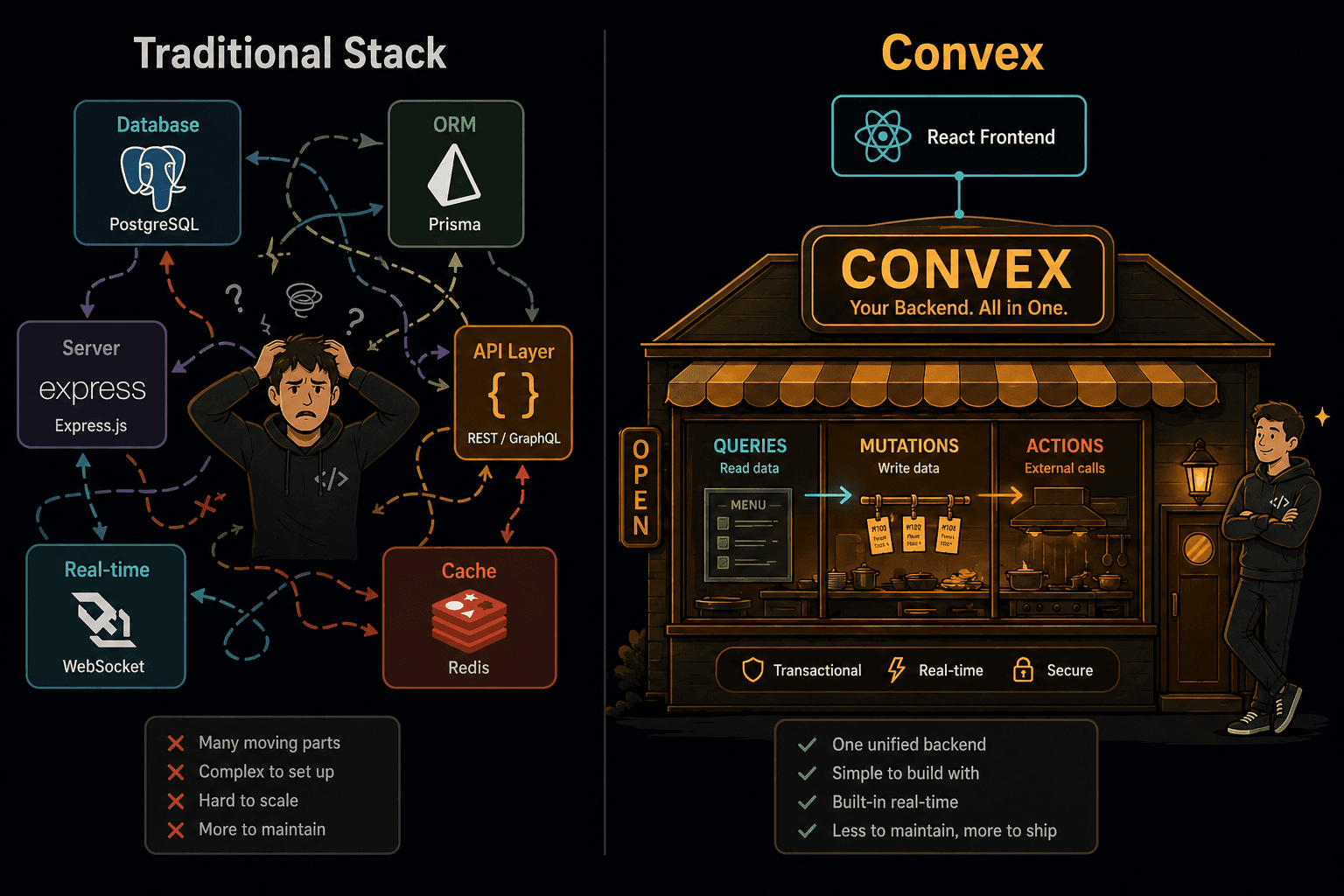
The traditional backend stack asks you to build and connect six different things: a database, an ORM, a server framework, an API layer, a real-time system, and a caching layer. Each piece has its own docs, its own failure modes, and its own mental model.
Convex replaces all of that with one system where the primitives (queries, mutations, actions) compose naturally. The database is reactive. The functions are typed. The API is automatic. The real-time is free.
It's a restaurant where the kitchen, the menu board, and the dining room screens are all part of the same system. Nothing is bolted on. Nothing is out of sync. The moment a dish is ready, every table knows.
If you've ever spent a weekend debugging stale cache, writing WebSocket reconnection logic, or untangling a REST API versioning mess, Convex feels like someone removed a weight you forgot you were carrying.
Subscribe to Wise Coding Weekly for one visual explainer in your inbox every week.
Wise Coding Weekly
Weekly visual explainers of frontend concepts.