Polymorphic Components: One Component, Many Forms
One component that renders as a button, a link, or anything else. The Swiss Army knife pattern explained with TypeScript.
Wise Coding Visual Explainer #04 · 10 min read · Visual Explainers
A Swiss Army knife doesn't care if you need a blade or a corkscrew. You pull out the tool you need, the handle stays the same. That's polymorphic components.
The Problem
You build a Button component. Looks great. Handles hover states, focus rings, loading spinners, size variants.
Then someone asks: "Can I use this Button as a link?"
Your Button renders <button>. Always. Hardcoded. If someone needs an anchor tag that looks like a button, they either duplicate all the styles onto <a> or wrap <button> inside <a> (invalid HTML, breaks accessibility).
What about Next.js <Link>? What about <label>? What about a card that's sometimes a <div>, sometimes an <a> linking to a detail page?
Every time the underlying element needs to change, you duplicate code or hack around the rigidity.
The Fix: The as Prop
A polymorphic component changes which HTML element it renders based on a prop. Same API, same styles, different element.
<Button>Click me</Button>                    // renders <button>
<Button as="a" href="/dashboard">Go</Button> // renders <a>
<Button as={Link} to="/settings">Settings</Button>  // renders Next.js Link
One handle. Different tools.
The Basic Version
function Box({ as, children, ...props }) {
  const Component = as || "div";
  return <Component {...props}>{children}</Component>;
}

<Box>I'm a div</Box>
<Box as="section">I'm a section</Box>
<Box as="article">I'm an article</Box>
Three lines of logic. The as prop determines what renders. Default to div. Spread the rest.
Works, but no TypeScript safety. You could pass href to a div and nobody complains.
Adding Type Safety
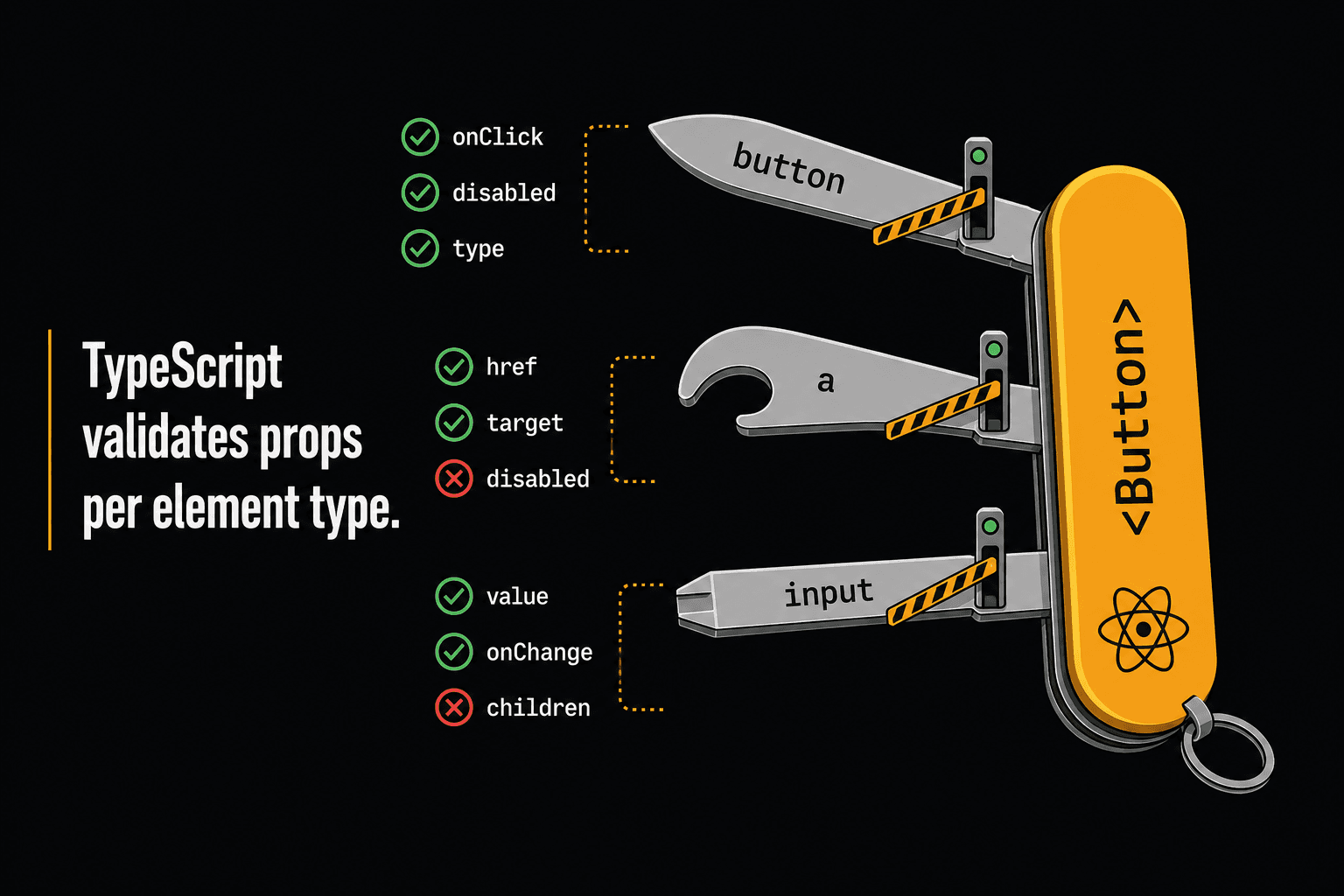
We need TypeScript to understand: if as is "a", then href is valid. If as is "button", then disabled is valid.
import { ComponentPropsWithoutRef, ElementType, ReactNode } from "react";

type BoxOwnProps = {
  children?: ReactNode;
  padding?: "sm" | "md" | "lg";
};

type BoxProps<C extends ElementType = "div"> = BoxOwnProps &
  { as?: C } &
  Omit<ComponentPropsWithoutRef<C>, keyof BoxOwnProps | "as">;

function Box<C extends ElementType = "div">({
  as,
  children,
  padding = "md",
  ...props
}: BoxProps<C>) {
  const Component = as || "div";
  return (
    <Component className={`p-${padding}`} {...props}>
      {children}
    </Component>
  );
}
Now this works:
<Box as="a" href="/dashboard" padding="lg">Dashboard</Box>  // ✅
<Box as="button" disabled padding="sm">Disabled</Box>       // ✅
<Box as="button" href="/dashboard">Nope</Box>               // ❌ href doesn't exist on button
<Box as="a" disabled>Nope</Box>                              // ❌ disabled doesn't exist on anchor
The key is ComponentPropsWithoutRef<C>. When C is "a", it resolves to all anchor props. When C is "button", all button props. TypeScript swaps the valid props based on what you pass to as.
Making It Reusable
Don't repeat these types for every component. Extract a utility:
// types/polymorphic.ts
export type PolymorphicProps<
  C extends ElementType,
  OwnProps = {}
> = OwnProps &
  { as?: C } &
  Omit<ComponentPropsWithoutRef<C>, keyof OwnProps | "as">;

export type PolymorphicRef<C extends ElementType> =
  ComponentPropsWithRef<C>["ref"];
Now any polymorphic component is clean:
type TextProps<C extends ElementType = "span"> = PolymorphicProps<C, {
  size?: "sm" | "md" | "lg";
  weight?: "normal" | "medium" | "bold";
}>;

function Text<C extends ElementType = "span">({
  as, size = "md", weight = "normal", children, ...props
}: TextProps<C>) {
  const Component = as || "span";
  return (
    <Component className={`text-${size} font-${weight}`} {...props}>
      {children}
    </Component>
  );
}

<Text>Default span</Text>
<Text as="h1" size="lg" weight="bold">Page Title</Text>
<Text as="a" href="/about">About us</Text>
<Text as="label" htmlFor="email" size="sm">Email</Text>
The forwardRef Gotcha
If your polymorphic component needs ref support, forwardRef and generics don't mix well. TypeScript loses the generic when you wrap with forwardRef. The fix is an explicit type annotation:
// Without annotation: as prop breaks
const Box = forwardRef(({ as, ...props }, ref) => { ... });

// With annotation: works correctly
type BoxComponent = <C extends ElementType = "div">(
  props: BoxProps<C>
) => ReactNode | null;

const Box: BoxComponent = forwardRef(
  <C extends ElementType = "div">(
    { as, children, ...props }: BoxProps<C>,
    ref: PolymorphicRef<C>
  ) => {
    const Component = as || "div";
    return <Component ref={ref} {...props}>{children}</Component>;
  }
);
This is the #1 thing that trips people up. If your as prop suddenly stops working after adding forwardRef, the missing type annotation is almost always why.
as vs asChild
The as prop has a TypeScript performance cost. For every polymorphic component, TypeScript resolves all valid props at the type level. In a large component library, this can slow your IDE.
Radix UI (and by extension Shadcn/ui) popularized an alternative: asChild. Instead of the parent deciding the element, the consumer passes their own element as a child:
// as prop: parent picks the element
<Button as="a" href="/dashboard">Go</Button>

// asChild: consumer brings their own element
<Button asChild>
  <a href="/dashboard">Go</a>
</Button>

// Works with any component
<Button asChild>
  <Link href="/settings">Settings</Link>
</Button>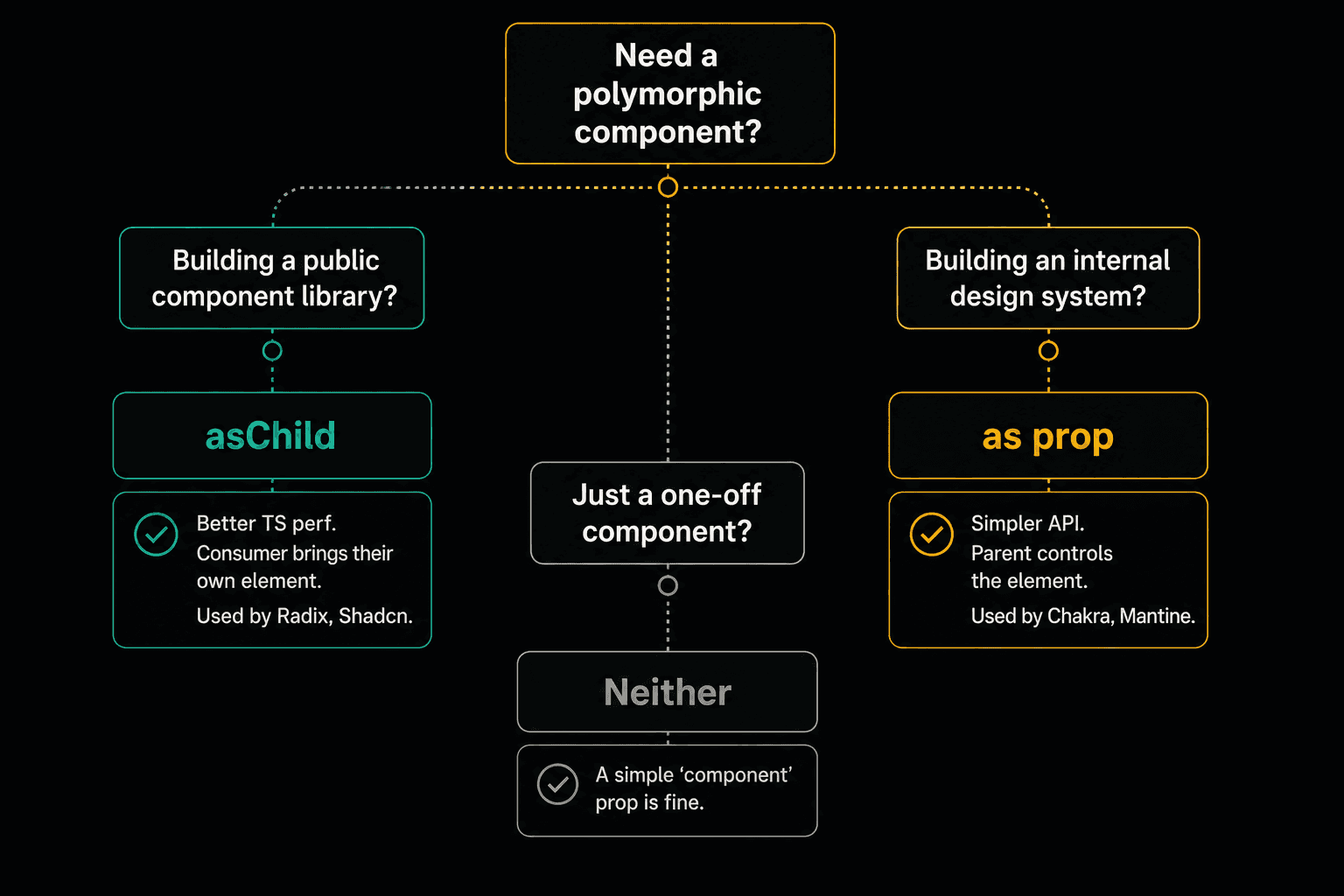
Use as for internal design systems, simpler API, parent controls the element. Chakra UI, Mantine.
Use asChild for public libraries, better TypeScript performance, consumer brings any element. Radix, Shadcn/ui.
Use neither if the component only renders one element type. Don't over-engineer.
Other approaches exist too: render props (BaseUI) and hooks that return spreadable props (Downshift). These solve similar composition problems but aren't specific to element polymorphism.
Quick Gotchas
Don't make everything polymorphic. A DatePicker is always a widget. A Modal is always a dialog. Only add as when there's a real need for different elements.
Always set a default. const Component = as || "div" prevents crashes when as is undefined.
Watch for prop conflicts. If your component has a color prop and the HTML element also has color, the Omit in the type handles it. Make sure your runtime logic doesn't accidentally spread conflicting values.
Don't create inline components for as:
// Bad: new reference every render
<Button as={React.forwardRef((props, ref) => <Link ref={ref} {...props} />)}>
  Dashboard
</Button>

// Good: stable reference
<Button as={Link} href="/dashboard">Dashboard</Button>
The Bigger Picture
Polymorphic components solve a real tension: you want consistent styling, but different semantic HTML depending on context. Without them, you end up with ButtonLink, ButtonLabel, ButtonDiv duplicates, or invalid HTML nesting.
The Swiss Army knife has one handle. The tools change. Your design system should work the same way.
Build the handle once. Let the tools change.
Wise Coding Weekly
Weekly visual explainers of frontend concepts.