React Performance: From Sluggish to Lightning
Most React performance advice is stuck in 2023. Here's what actually matters in 2026, explained through a highway traffic analogy.
Wise Coding Visual Explainer #03 · 18 min read · Visual Explainers
Your React app is a highway. Components are cars. Renders are trips. The goal isn't fewer cars on the road. It's making traffic flow.
Most React Performance Advice is Outdated
If you've read a React performance article in the last three years, it probably told you to wrap things in useMemo and useCallback. Maybe it mentioned React.memo. Maybe it told you to "avoid unnecessary re-renders."
That advice wasn't great in 2023. In 2026, with the React Compiler shipping auto-memoization, it's actively counterproductive.
Here's what actually causes performance problems in modern React apps:
- Poor state placement causing entire subtrees to re-render
- Blocking the main thread during heavy updates instead of using concurrent features
- Loading everything upfront instead of splitting and deferring
- useEffect chains that trigger cascade re-renders
None of these are fixed by adding useMemo. All of them have clean, modern solutions.
Let's fix your highway.
The Rubbernecking Problem
Understanding Re-renders
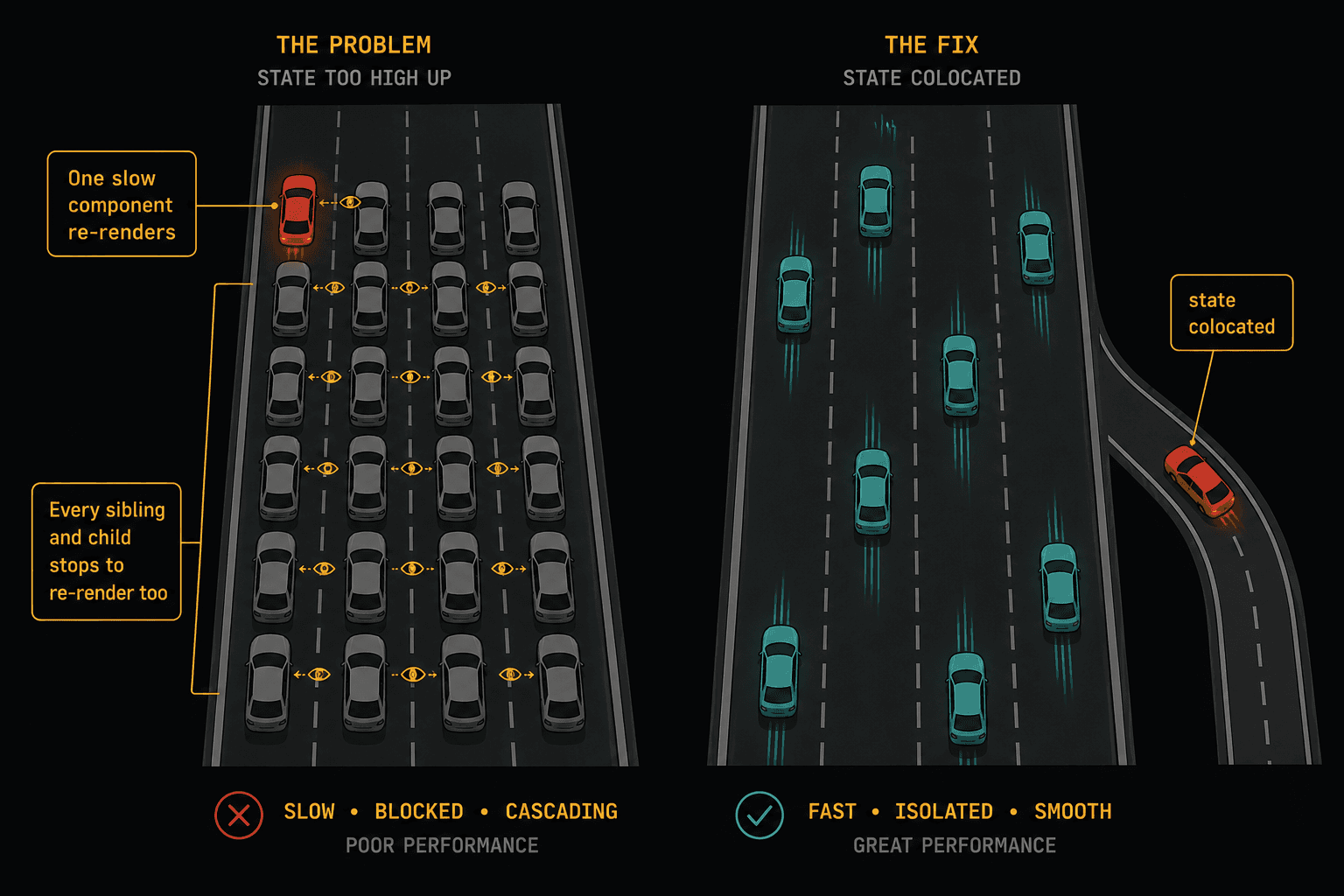
On a real highway, one car brakes suddenly. The car behind it brakes. The car behind that one brakes harder. Within seconds, traffic is stopped for a kilometer. Nobody knows why. The original car drove off five minutes ago.
That's exactly how re-renders cascade in React.
When a component's state changes, React re-renders that component AND every child component in its subtree. If that state lives at the top of your tree, every component below it re-renders. Even the ones that don't use that state. Even the ones that display completely static content.
// The problem: state at the wrong level
function App() {
  const [searchQuery, setSearchQuery] = useState("");

  return (
    <div>
      <Header />                          {/* re-renders */}
      <SearchBar query={searchQuery} onChange={setSearchQuery} />
      <Sidebar />                         {/* re-renders */}
      <ProductList />                     {/* re-renders */}
      <Footer />                          {/* re-renders */}
    </div>
  );
}
Every keystroke in the search bar re-renders the Header, Sidebar, ProductList, and Footer. None of them care about searchQuery. They're rubbernecking.
The Fix: State Colocation
Move the state to where it's actually used.
// The fix: state lives where it belongs
function App() {
  return (
    <div>
      <Header />
      <SearchSection />     {/* state lives here now */}
      <Sidebar />
      <ProductList />
      <Footer />
    </div>
  );
}

function SearchSection() {
  const [searchQuery, setSearchQuery] = useState("");

  return (
    <div>
      <SearchBar query={searchQuery} onChange={setSearchQuery} />
      <SearchResults query={searchQuery} />
    </div>
  );
}
Now when the user types, only SearchSection and its children re-render. Header, Sidebar, ProductList, and Footer are untouched. No memoization needed. You just moved the state closer to where it's consumed.
This is the single most impactful performance fix for most React apps. Not memoization. Not lazy loading. Just putting state in the right place.
The Children Pattern
Sometimes you can't move the state down because the component that owns it also needs to render children. The children pattern solves this:
// Before: ScrollTracker re-renders everything
function ScrollTracker() {
  const [scrollY, setScrollY] = useState(0);

  useEffect(() => {
    const handler = () => setScrollY(window.scrollY);
    window.addEventListener("scroll", handler);
    return () => window.removeEventListener("scroll", handler);
  }, []);

  return (
    <div>
      <ScrollIndicator position={scrollY} />
      <HeavyContent />        {/* re-renders on every scroll pixel */}
      <MoreHeavyContent />     {/* re-renders on every scroll pixel */}
    </div>
  );
}// After: children don't re-render
function ScrollTracker({ children }) {
const [scrollY, setScrollY] = useState(0);
useEffect(() => {
const handler = () => setScrollY(window.scrollY);
window.addEventListener("scroll", handler);
return () => window.removeEventListener("scroll", handler);
}, []);
return (
<div>
<ScrollIndicator position={scrollY} />
{children} {/* passed from parent, not re-created */}
</div>
);
}
// Usage
function App() {
return (
<ScrollTracker>
<HeavyContent />
<MoreHeavyContent />
</ScrollTracker>
);
}children is created by App, not by ScrollTracker. When ScrollTracker re-renders from scroll updates, the childrenprop reference hasn't changed, so React skips re-rendering them. Zero memoization. Just a structural change.
Stop Memoizing Everything
The Toll Booth Problem
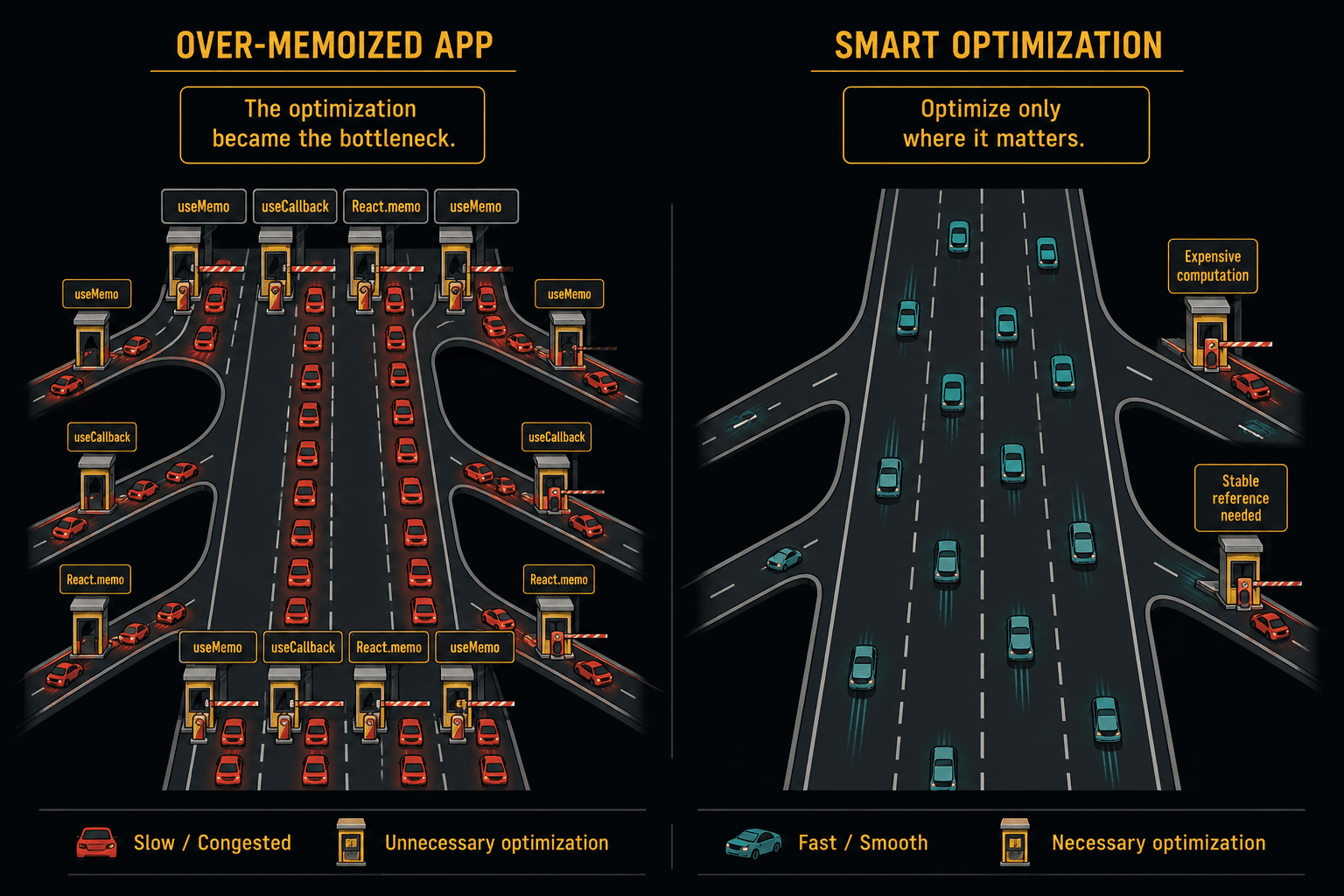
Every useMemo and useCallback in your code is a toll booth. It has a cost:
- Memory to store the cached value
- Comparison logic to check dependencies on every render
- Cognitive overhead for every developer who reads the code
For cheap operations, the toll booth costs more than the computation it's "saving”.
// This useMemo costs more than it saves
const fullName = useMemo(
  () => `${firstName} ${lastName}`,
  [firstName, lastName]
);

// Just compute it. String concatenation is nearly free.
const fullName = `${firstName} ${lastName}`;// This useCallback is pointless
const handleClick = useCallback(() => {
setCount(c => c + 1);
}, []);
// Unless the child is wrapped in React.memo AND
// the function identity actually matters, this does nothing.
const handleClick = () => {
setCount(c => c + 1);
};The React Compiler Changes Everything
The React Compiler (shipping with React 19+) auto-memoizes components, hooks, and values at the compiler level. It analyzes your code at build time and inserts memoization where it actually helps.
This means:
- Manual
useMemois almost never needed anymore - Manual
useCallbackis almost never needed anymore React.memowrappers become redundant for most components- Your code gets simpler AND faster
// 2023 React: manually memoize everything
const ExpensiveList = React.memo(function ExpensiveList({ items, onSelect }) {
  const sorted = useMemo(() => items.sort((a, b) => a.name.localeCompare(b.name)), [items]);
  const handleSelect = useCallback((id) => onSelect(id), [onSelect]);

  return sorted.map(item => (
    <Item key={item.id} item={item} onSelect={handleSelect} />
  ));
});

// 2026 React: just write the code
function ExpensiveList({ items, onSelect }) {
  const sorted = items.toSorted((a, b) => a.name.localeCompare(b.name));

  return sorted.map(item => (
    <Item key={item.id} item={item} onSelect={onSelect} />
  ));
}
// The compiler handles memoization for you.
When Memoization Still Matters
There are still legitimate cases:
- Truly expensive computations that take 1ms+ (filtering/sorting thousands of items, complex math, canvas rendering). Profile first.
- Third-party libraries that rely on stable references (some charting libraries, form libraries, animation libraries break without stable callbacks)
- useEffect dependencies where an unstable reference would cause an infinite loop
But these are edge cases, not defaults. Start without memoization. Profile. Add it only where you measure a real problem.
The HOV Lane
useTransition and startTransition
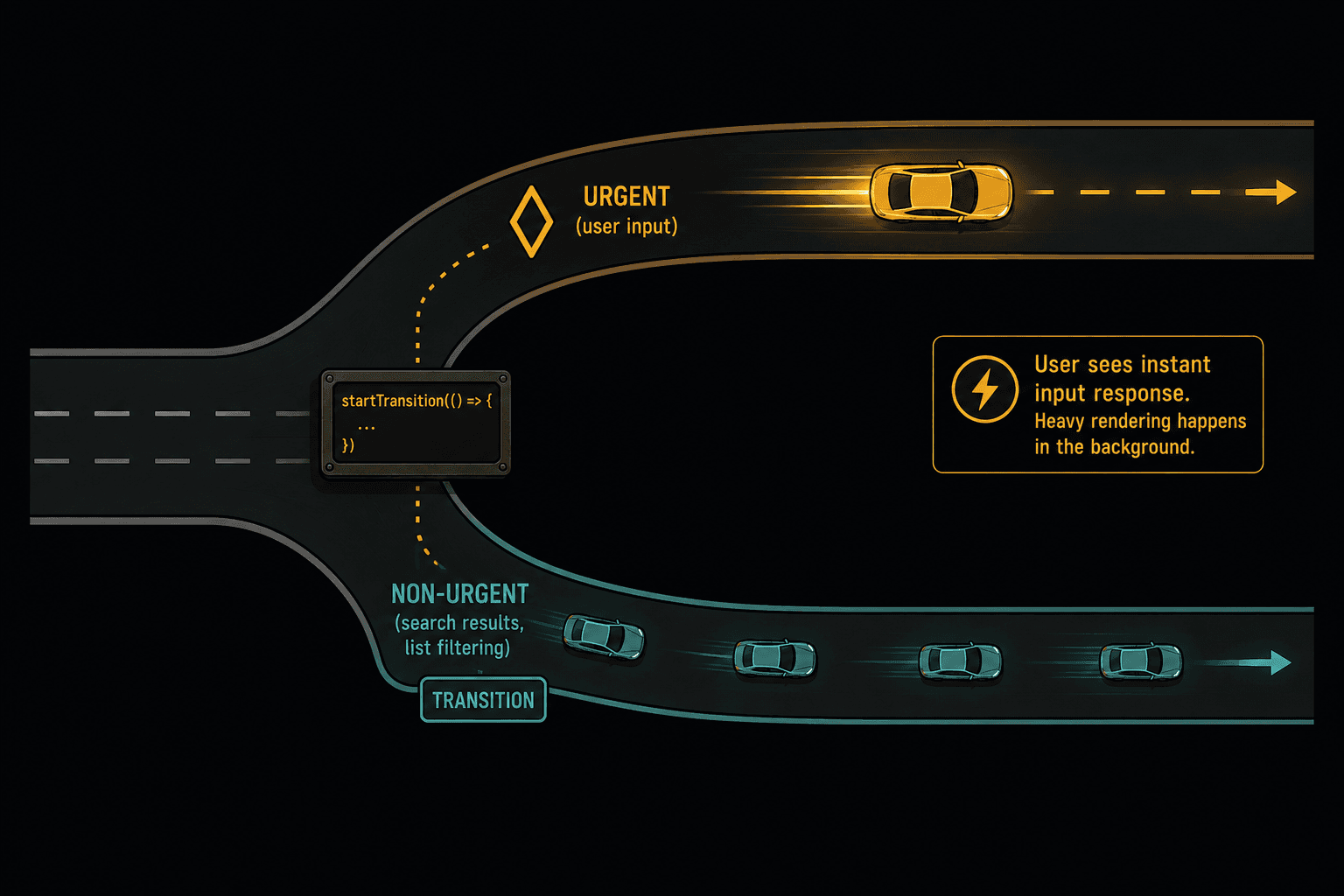
This is the most underused performance tool in React. useTransition lets you tell React: "this state update is not urgent. Don't let it block user input."
The problem it solves:
// Without useTransition: typing feels laggy
function Search() {
  const [query, setQuery] = useState("");
  const [results, setResults] = useState([]);

  const handleChange = (e) => {
    const value = e.target.value;
    setQuery(value);                // urgent: update the input
    setResults(filterItems(value)); // expensive: blocks the input
  };

  return (
    <div>
      <input value={query} onChange={handleChange} />
      <ResultList items={results} />
    </div>
  );
}
Every keystroke triggers filterItems which blocks the main thread. The input feels laggy because React can't update the cursor position until the filtering finishes.
// With useTransition: typing is instant
function Search() {
  const [query, setQuery] = useState("");
  const [results, setResults] = useState([]);
  const [isPending, startTransition] = useTransition();

  const handleChange = (e) => {
    const value = e.target.value;
    setQuery(value);                          // urgent: updates immediately

    startTransition(() => {
      setResults(filterItems(value));         // deferred: renders in background
    });
  };

  return (
    <div>
      <input value={query} onChange={handleChange} />
      {isPending && <Spinner />}
      <ResultList items={results} />
    </div>
  );
}
Now the input updates on every keystroke with zero lag. The filtered results update in the background. If the user types another character before the results finish rendering, React abandons the stale render and starts a new one. No wasted work.
The isPending boolean gives you a free loading state. Show a spinner, dim the results, whatever makes sense.
When to use it:
- Search/filter operations on large datasets
- Tab switching with heavy content
- Navigation transitions
- Any state update where the result can arrive slightly late without hurting UX
The Speed Limit Sign
useDeferredValue
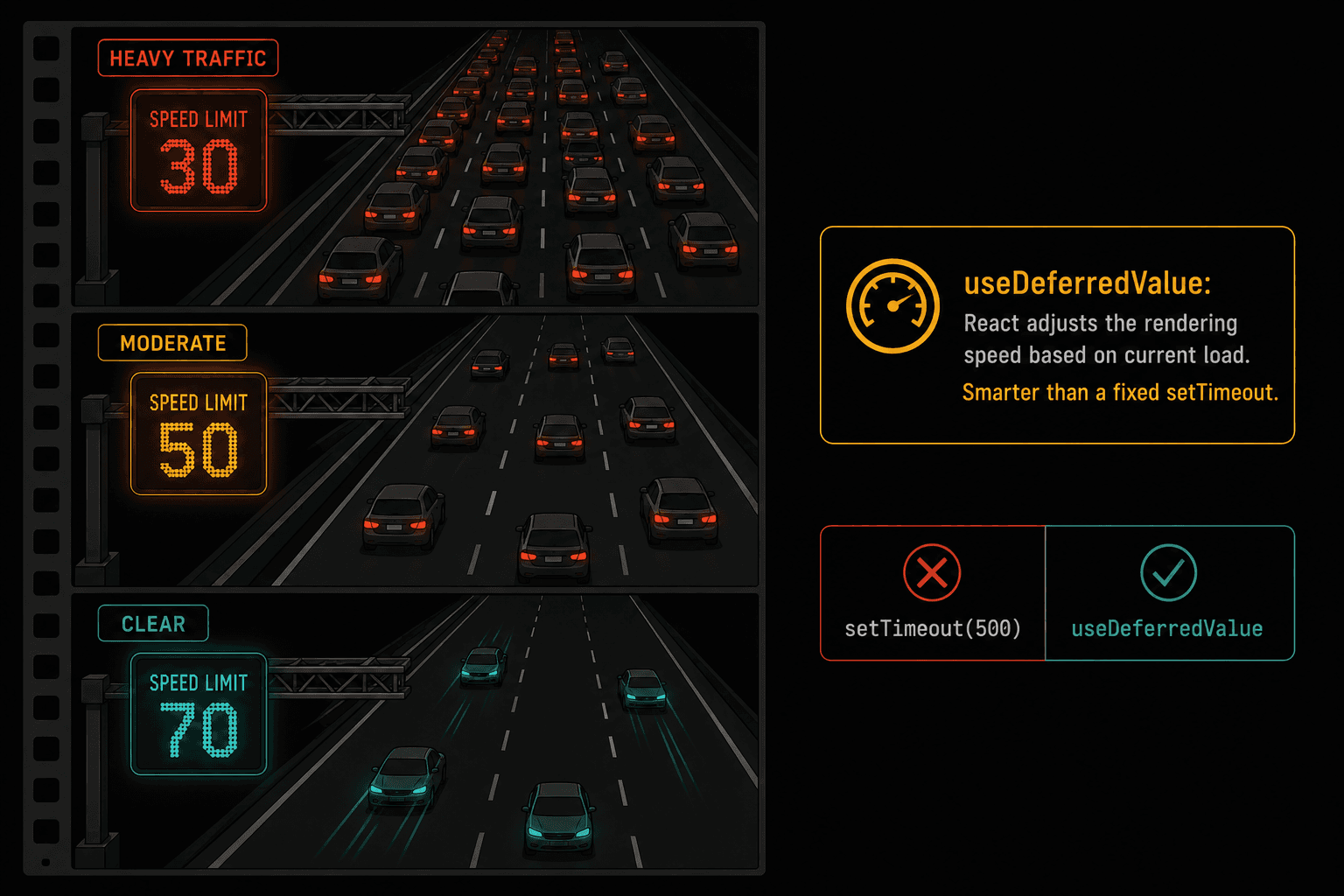
useDeferredValue is like useTransition but for values you don't control. When the value comes from a parent prop or external source and you can't wrap the state update in startTransition, you defer the rendering instead.
function SearchResults({ query }) {
  // query changes on every keystroke from parent
  // but we can defer when we actually render the expensive list
  const deferredQuery = useDeferredValue(query);
  const isStale = query !== deferredQuery;

  const filtered = filterExpensiveList(deferredQuery);

  return (
    <div style={{ opacity: isStale ? 0.6 : 1 }}>
      {filtered.map(item => <ResultCard key={item.id} item={item} />)}
    </div>
  );
}
React renders with the old deferredQuery while the new value is processing in the background. The list dims slightly (opacity) to signal it's updating. The input never lags.
useTransition vs useDeferredValue: when to use which
- Use
useTransitionwhen you own the state update (you're the one callingsetState) - Use
useDeferredValuewhen you receive the value from somewhere else (props, context, URL params)
Most articles make this confusing. That's the whole rule.
The On-Ramp
Code Splitting and Lazy Loading
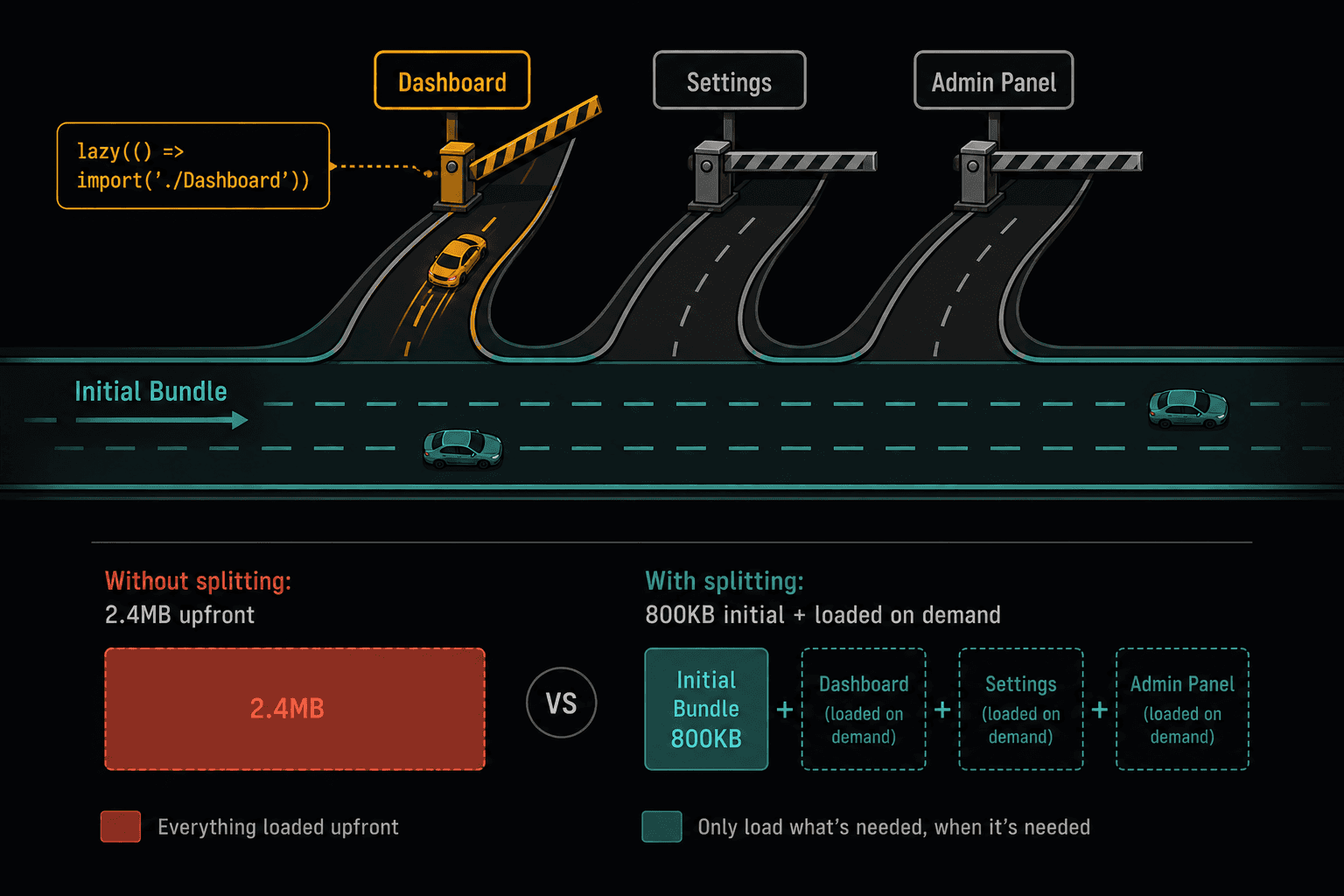
You wouldn't build every highway exit at once if you knew most drivers only need one. Don't load your entire app when the user only needs the current page.
import { lazy, Suspense } from "react";

// These only load when the user navigates to them
const Dashboard = lazy(() => import("./pages/Dashboard"));
const Settings = lazy(() => import("./pages/Settings"));
const AdminPanel = lazy(() => import("./pages/AdminPanel"));

function App() {
  return (
    <Suspense fallback={<PageSkeleton />}>
      <Routes>
        <Route path="/" element={<Home />} />         {/* loaded immediately */}
        <Route path="/dashboard" element={<Dashboard />} />   {/* loaded on demand */}
        <Route path="/settings" element={<Settings />} />     {/* loaded on demand */}
        <Route path="/admin" element={<AdminPanel />} />      {/* loaded on demand */}
      </Routes>
    </Suspense>
  );
}
If you're using Next.js (which you probably are in 2026), route-based code splitting happens automatically. Every page in the app/ directory is its own chunk. But component-level splitting is still manual:
// Heavy component that most users never see
const DataVisualization = lazy(() => import("./DataVisualization"));

function Report({ showChart }) {
  return (
    <div>
      <ReportSummary />
      {showChart && (
        <Suspense fallback={<ChartSkeleton />}>
          <DataVisualization />
        </Suspense>
      )}
    </div>
  );
}
The common mistake: splitting too granularly. Every lazy() boundary adds overhead (a network request, a loading state, a brief flash). Don't lazy-load a button component. Lazy-load routes and heavy feature sections.
The Traffic Camera
Profiling Before Optimizing
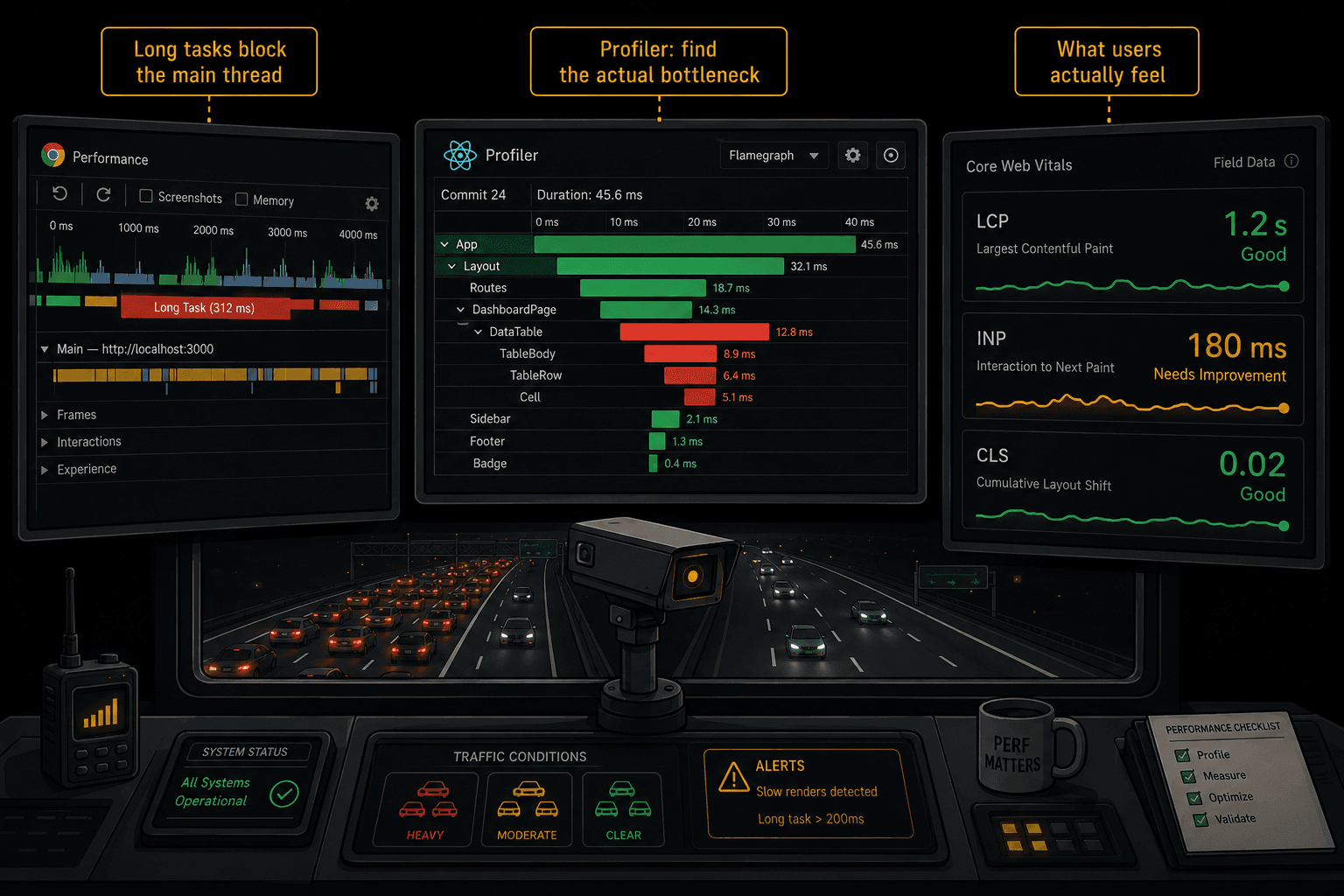
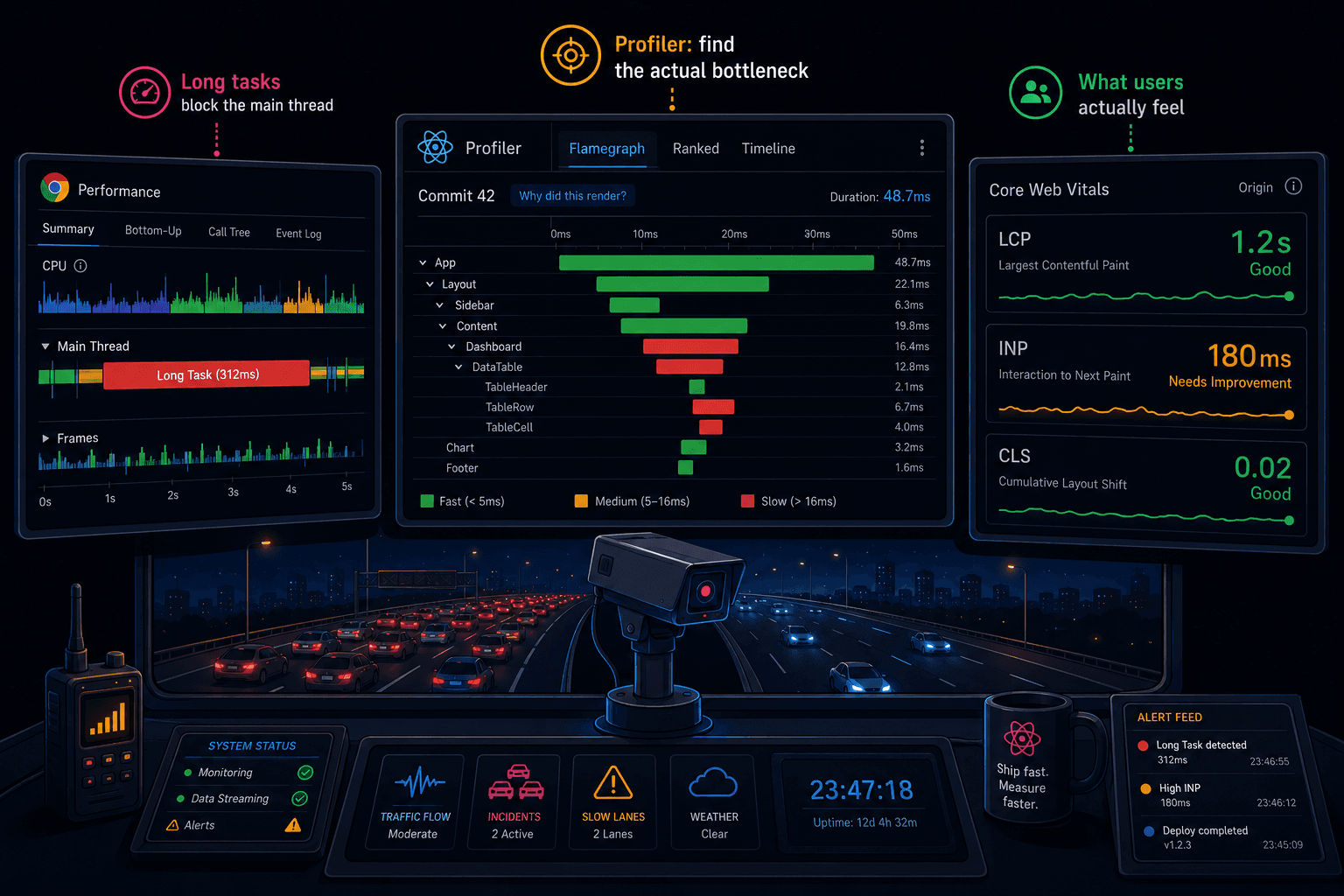
Everything above is useless if you're guessing where the bottleneck is.
Rule: never optimize without profiling first.
Here's how to actually find performance problems:
React DevTools Profiler
- Open React DevTools, go to the Profiler tab
- Click Record, interact with the slow part of your app, click Stop
- Look at the flame chart. The widest bars are the slowest components.
- Click a component to see: why it re-rendered (state change, parent re-render, context change) and how long it took.
If a component took less than 1ms to render, it's not your problem. Don't optimize it. Look for the ones taking 16ms+ (that's a full frame budget at 60fps).
Chrome Performance Tab
- Open DevTools, Performance tab
- Click Record, interact, Stop
- Look for "Long Tasks" (red bars in the timeline). Anything over 50ms blocks user input.
- Click into it to see what JavaScript function caused it.
Core Web Vitals
The metrics that actually matter for users:
- LCP (Largest Contentful Paint): How fast the main content appears. Target: under 2.5s.
- INP (Interaction to Next Paint): How fast the UI responds to clicks/taps. Target: under 200ms. This is where
useTransitionmakes the biggest difference. - CLS (Cumulative Layout Shift): How much things jump around. Target: under 0.1.
If your INP is over 200ms, that's when you reach for concurrent features. If your LCP is high, that's when you code-split and optimize loading. If your CLS is bad, that's a layout problem, not a React problem.
The Overlooked Hazards
These are the performance bugs I see in production codebases that almost nobody talks about.
1. Creating Components Inside Components
This is the single worst React anti-pattern and it's still everywhere:
// NEVER do this
function Parent() {
  // This component is RECREATED on every render
  function Child() {
    return <div>I lose all state on every parent render</div>;
  }

  return <Child />;
}
Every time Parent re-renders, Child is a brand new function. React sees a different component type, unmounts the old one, and mounts a new one. All state, all effects, all DOM nodes are destroyed and recreated. This is not a re-render. It's a full remount. On every single parent render.
The fix is obvious but I still see this in senior developers' code:
// Child is defined OUTSIDE Parent
function Child() {
  return <div>I keep my state across parent renders</div>;
}

function Parent() {
  return <Child />;
}
2. Unstable Keys in Lists
// Bad: index as key when list can reorder
{items.map((item, index) => (
  <ListItem key={index} item={item} />
))}

// Also bad: generating new keys every render
{items.map(item => (
  <ListItem key={Math.random()} item={item} />
))}

// Good: stable, unique identifier
{items.map(item => (
  <ListItem key={item.id} item={item} />
))}
When keys change, React unmounts the old component and mounts a new one. If you use Math.random() as a key, every item remounts on every render. If you use array index and the list reorders, React swaps the wrong DOM nodes and you get ghost state bugs.
3. Context Providers at the Wrong Level
// Every theme change re-renders the ENTIRE app
function App() {
  const [theme, setTheme] = useState("dark");

  return (
    <ThemeContext.Provider value={{ theme, setTheme }}>
      <EntireAppTree />  {/* everything re-renders */}
    </ThemeContext.Provider>
  );
}
The fix: split your context into two. One for the value (changes often), one for the setter (never changes):
const ThemeContext = createContext("dark");
const ThemeSetterContext = createContext(() => {});

function ThemeProvider({ children }) {
  const [theme, setTheme] = useState("dark");

  return (
    <ThemeSetterContext.Provider value={setTheme}>
      <ThemeContext.Provider value={theme}>
        {children}
      </ThemeContext.Provider>
    </ThemeSetterContext.Provider>
  );
}

// Components that only CHANGE the theme don't re-render when theme value changes
function ThemeToggle() {
  const setTheme = useContext(ThemeSetterContext); // stable reference
  return <button onClick={() => setTheme(t => t === "dark" ? "light" : "dark")}>Toggle</button>;
}
4. useEffect Chains
The #1 performance killer in most React apps. One effect updates state, which triggers a render, which triggers another effect, which updates more state:
// The cascade: 4 renders for one user action
function UserProfile({ userId }) {
  const [user, setUser] = useState(null);
  const [posts, setPosts] = useState([]);
  const [followers, setFollowers] = useState(0);

  useEffect(() => { fetchUser(userId).then(setUser); }, [userId]);
  useEffect(() => {
    if (user) fetchPosts(user.id).then(setPosts);
  }, [user]);       // triggers when user state updates
  useEffect(() => {
    if (user) fetchFollowers(user.id).then(setFollowers);
  }, [user]);       // also triggers when user state updates
}
Three effects, three separate render cycles, three network waterfalls. The fix: fetch everything you need in one effect, or better yet, use a data-fetching library that handles this:
function UserProfile({ userId }) {
  const [data, setData] = useState(null);

  useEffect(() => {
    async function load() {
      const user = await fetchUser(userId);
      const [posts, followers] = await Promise.all([
        fetchPosts(user.id),
        fetchFollowers(user.id),
      ]);
      setData({ user, posts, followers }); // one state update, one render
    }
    load();
  }, [userId]);
}
5. Object Literals in JSX Props
// New object on every render. If child uses React.memo, it breaks.
<Map center={{ lat: 51.5, lng: -0.1 }} />

// New array on every render
<Chart data={[1, 2, 3, 4, 5]} />

// New inline style on every render
<div style={{ marginTop: 20 }} />
Each of these creates a new reference on every render. If the child component uses React.memo or depends on reference equality, the memoization is broken because the prop is always "new."
The fix: move static values outside the component:
const MAP_CENTER = { lat: 51.5, lng: -0.1 };
const CHART_DATA = [1, 2, 3, 4, 5];
const STYLE = { marginTop: 20 };

function App() {
  return (
    <>
      <Map center={MAP_CENTER} />
      <Chart data={CHART_DATA} />
      <div style={STYLE} />
    </>
  );
}
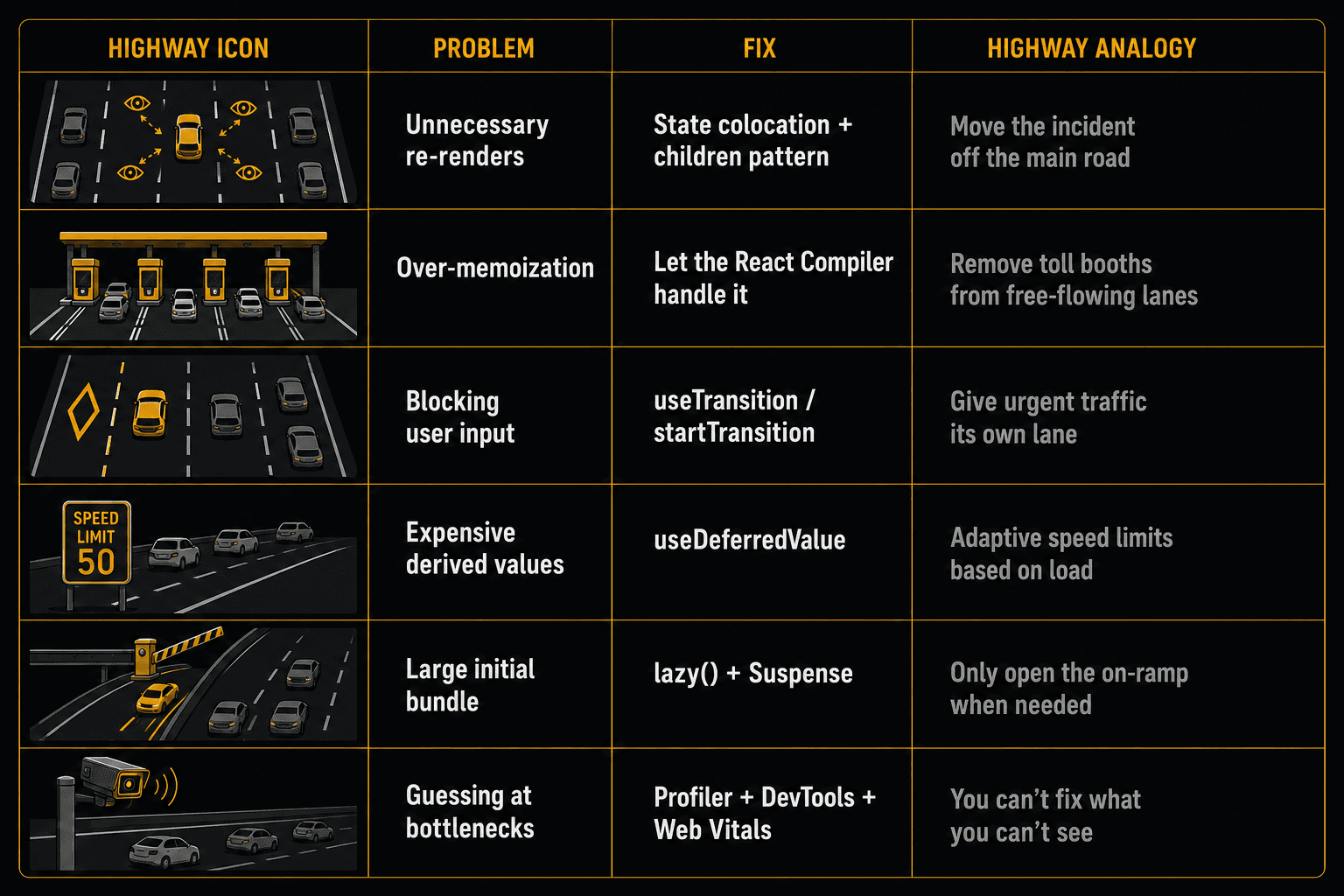
The Cheat Sheet
The Bigger Picture
React performance in 2026 is not about adding optimization hooks to your code. It's about removing unnecessary work.
Move state down. Split contexts. Use concurrent features for heavy updates. Lazy-load what users don't need yet. Profile before you optimize. And let the React Compiler handle the memoization you used to do by hand.
A highway doesn't get faster by adding more toll booths. It gets faster by removing bottlenecks, adding express lanes, and only building exits where people actually drive.
Your React app works the same way.
Third article in the Wise Coding series. If the highway framing made React performance click, subscribe to Wise Coding Weekly for one visual explainer in your inbox every week.
Wise Coding Weekly
Weekly visual explainers of frontend concepts.