The React Mistakes That Only Show Up at Scale
Five architectural decisions that work at 10 components and break at 200. Prop drilling, barrel files, circular deps, and the 800-line component problem.

Wise Coding Visual Explainer #05 · 12 min read · Dev Tips
A three-story building can get away with a lot. Shallow foundation, no steel frame, questionable plumbing. It stands. It passes inspection. Nobody complains. Now try building 30 stories on that same foundation. The cracks show up fast.
Your React app works the same way.
This Isn't a Performance Article
The performance post covered how to make your app faster. This one is different. These are architectural decisions that work perfectly at 10 components but quietly break your codebase at 200. You won't feel the pain until you're deep enough that fixing it means rewriting half the app.
Every mistake here is something I've seen in production codebases with 50+ components and 3+ developers. They all passed code review. They all worked fine when the project was small.
1. Prop Drilling Is Fine Until It Isn't
At 5 components deep, passing a user prop through each level is annoying but manageable. You can trace it. You can find it. You know where it comes from.
At 15 components deep across 6 different feature modules, prop drilling becomes untraceable. A new team member opens a component, sees user in the props, and has no idea if it came from the root layout, a page component, a feature wrapper, or some intermediate component that added a field to it along the way.
// This is fine at 3 levels
<App user={user}>
  <Dashboard user={user}>
    <Header user={user} />
  </Dashboard>
</App>

// This is a nightmare at 8 levels
<App user={user}>
  <Layout user={user}>
    <Sidebar user={user}>
      <Navigation user={user}>
        <NavSection user={user}>
          <NavItem user={user}>
            <UserBadge user={user}>      {/* finally used here */}
              <Avatar user={user} />     {/* and here */}
            </UserBadge>
          </NavItem>
        </NavSection>
      </Navigation>
    </Sidebar>
  </Layout>
</App>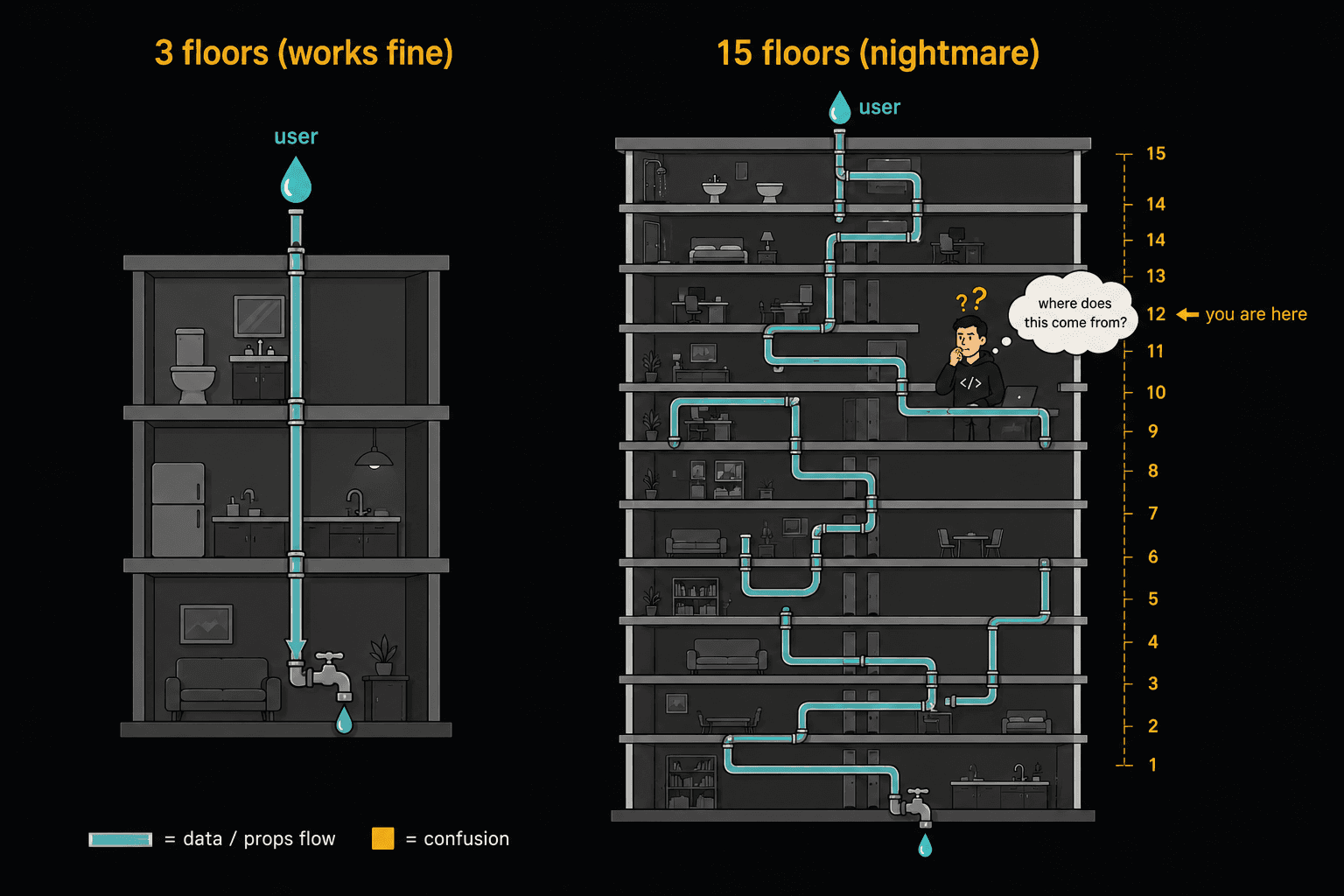
The Fix (and When to Apply It)
Context is the obvious solution, but context has its own scale problems (see #2). The real fix is rethinking your component boundaries.
Ask: does this intermediate component actually need this prop, or is it just passing it through? If it's just passing, you have two options.
Component composition:
// Instead of drilling user through 5 layers
// Compose at the top and pass the assembled component
function App() {
  const user = useUser();

  return (
    <Layout
      sidebar={<Sidebar nav={<NavItem badge={<UserBadge user={user} />} />} />}
    />
  );
}
The intermediate components don't even know user exists. They accept pre-built chunks and render them.
Context, scoped tightly:
// Don't put it at the root. Put it where the data is actually needed.
function DashboardSection() {
  const user = useUser();

  return (
    <DashboardUserContext.Provider value={user}>
      <DashboardHeader />
      <DashboardContent />
      <DashboardFooter />
    </DashboardUserContext.Provider>
  );
}
The context wraps only the subtree that needs it, not the entire app.
2. Context Provider Nesting Gets Out of Control
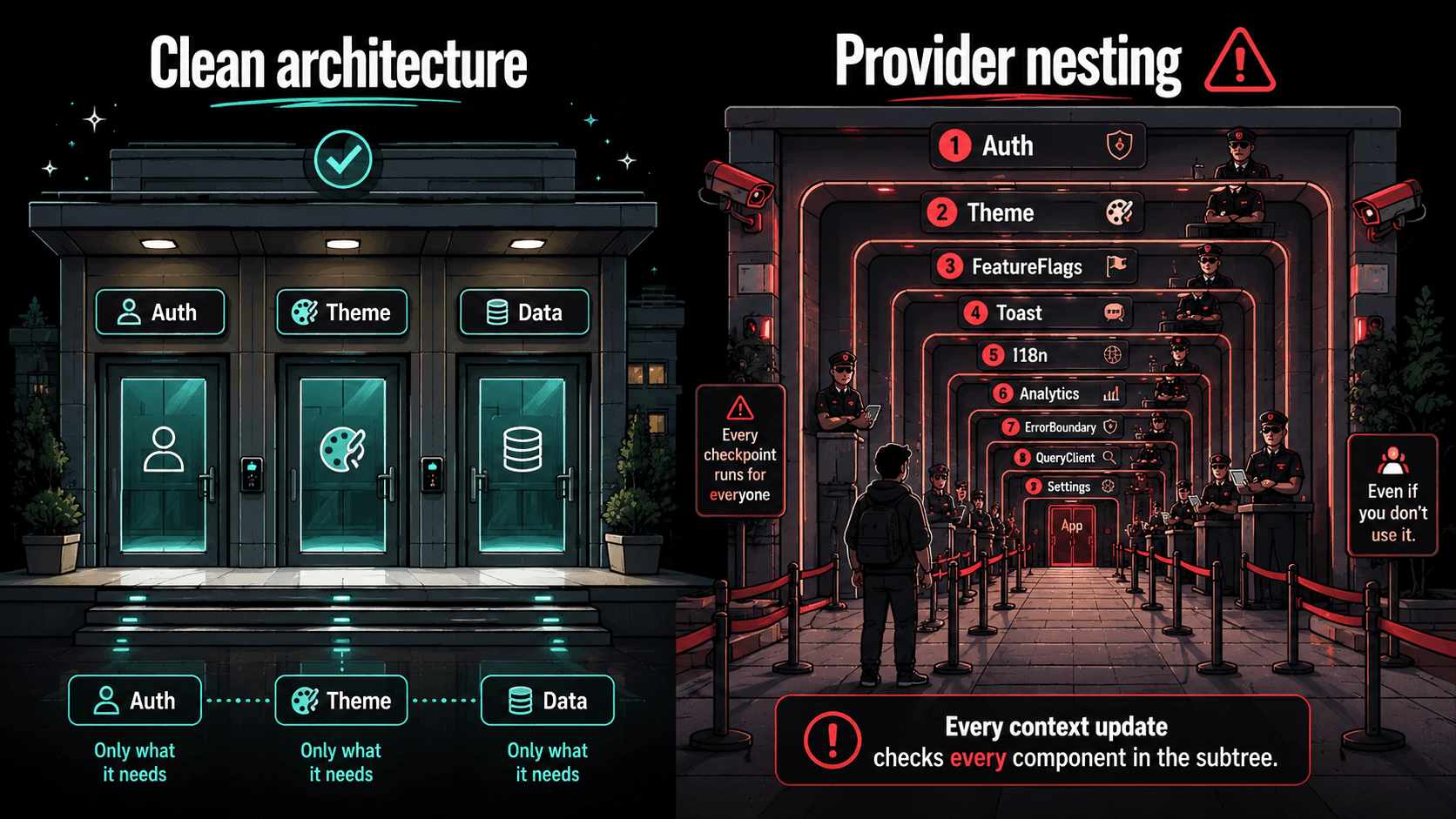
One or two context providers at the root is clean. Then you add theme. Then auth. Then feature flags. Then toast notifications. Then a modal manager. Then a form context. Then your app's root looks like this:
function App() {
  return (
    <AuthProvider>
      <ThemeProvider>
        <FeatureFlagProvider>
          <ToastProvider>
            <ModalProvider>
              <QueryProvider>
                <FormProvider>
                  <AnalyticsProvider>
                    <RouterProvider>
                      <Layout />    {/* buried under 9 layers */}
                    </RouterProvider>
                  </AnalyticsProvider>
                </FormProvider>
              </QueryProvider>
            </ModalProvider>
          </ToastProvider>
        </FeatureFlagProvider>
      </ThemeProvider>
    </AuthProvider>
  );
}
This isn't just ugly. It has real consequences. Every context provider creates a node in the React tree. When any of these contexts update, React has to walk the tree to find consumers. With 9 nested providers, a single theme change triggers React to check every component in the entire subtree looking for useContext(ThemeContext) consumers.
The Fix
Flatten your providers with a composer utility:
function ComposeProviders({ providers, children }) {
  return providers.reduceRight(
    (acc, [Provider, props]) => <Provider {...props}>{acc}</Provider>,
    children
  );
}

// Usage
function App() {
  return (
    <ComposeProviders
      providers={[
        [AuthProvider, {}],
        [ThemeProvider, { defaultTheme: "dark" }],
        [QueryProvider, { client: queryClient }],
        [ToastProvider, {}],
      ]}
    >
      <Layout />
    </ComposeProviders>
  );
}
This doesn't change the runtime behavior (they're still nested), but it makes the code maintainable and easy to reorder or remove.
More importantly, scope your contexts. Not everything belongs at the root. A FormProvider should wrap a form, not the entire app. A ModalProvider should wrap the section that uses modals. Push providers as close to their consumers as possible.
3. Barrel Files Are Silently Killing Your Bundle
This is the most invisible problem on the list. You probably have index.ts files that look like this:
// components/index.ts
export { Button } from "./Button";
export { Input } from "./Input";
export { Modal } from "./Modal";
export { DataTable } from "./DataTable";
export { Chart } from "./Chart";
export { HeavyVisualization } from "./HeavyVisualization";
And then import like this:
// Somewhere in your app
import { Button } from "@/components";
Clean, right? Except bundlers often can't tree-shake barrel files properly. When you import Button from that barrel file, depending on your bundler configuration, you might be loading DataTable, Chart, and HeavyVisualization into the bundle too.
This isn't theoretical. Atlassian reported 75% faster builds after removing barrel files from their Jira frontend codebase. Individual developers have reported 400KB bundle size reductions from removing a single barrel file that re-exported SVG components.
The problem extends beyond production bundles. Jest doesn't tree-shake at all, so every test file that imports from a barrel file loads the entire dependency graph. Teams have reported test suites taking 46 seconds for 240 tests, with most of the time spent on module loading, not test execution.
// What you think happens
import { Button } from "@/components";
// Bundler loads: Button.tsx (2KB)

// What actually happens (often)
import { Button } from "@/components";
// Bundler loads: Button.tsx + Input.tsx + Modal.tsx +
// DataTable.tsx + Chart.tsx + HeavyVisualization.tsx (180KB)
The Fix
Use direct imports:
// Instead of
import { Button } from "@/components";

// Import directly
import { Button } from "@/components/Button";
If you're on Next.js, use optimizePackageImports in your config for third-party libraries:
// next.config.js
module.exports = {
  experimental: {
    optimizePackageImports: ["lucide-react", "@mantine/core"],
  },
};
If you must use barrel files, mark your package as side-effect-free so the bundler knows it can safely tree-shake:
{
  "name": "my-components",
  "sideEffects": false
}
And use eslint-plugin-import with the no-restricted-imports rule to warn when someone imports from a barrel file in the app code.
4. Circular Dependencies Work Until They Don't
Two modules importing each other is easy to do accidentally and hard to catch because it often works fine in development.
// UserCard.tsx
import { formatUserName } from "./userUtils";

export function UserCard({ user }) {
  return <div>{formatUserName(user)}</div>;
}

// userUtils.ts
import { UserCard } from "./UserCard";   // circular!

export function formatUserName(user) {
  return `${user.first} ${user.last}`;
}

export function renderUserPreview(user) {
  return <UserCard user={user} />;
}
In dev mode with hot module replacement, this often works because the modules get evaluated in an order that happens to resolve correctly. In a production build with a different evaluation order, UserCard might be undefined when userUtilstries to import it. You get a cryptic "undefined is not a function" error in production that never appears in development.
Inkitt (the company behind the Galatea reading app) reported finding 800+ circular dependencies in their React Native codebase when they tried to migrate to Expo. Most were benign, but the sheer number made it impossible to debug which ones were causing undefined import crashes during production builds.
With the React Compiler, circular dependencies become even more dangerous. There's an open GitHub issue documenting that cyclic dependencies can cause undefined imports specifically when the compiler is enabled, because the compiler changes module evaluation timing.
The Fix
Use eslint-plugin-import with the no-cycle rule:
{
  "rules": {
    "import/no-cycle": ["error", { "maxDepth": 3 }]
  }
}
Use dpdm to scan your existing codebase:
npx dpdm --no-warning --no-tree -T **/*.tsThis gives you a full list of circular dependencies. Fix the critical ones (any cycle involving components that import each other), and add the ESLint rule to prevent new ones from being introduced.
The structural fix: if two modules need each other, they belong in the same module, or there's a third module that should exist between them to break the cycle.
5. The 800-Line Component File
Every codebase has one. The component that started as a simple form and grew into a god component that handles form state, validation, API calls, error handling, success toasts, analytics tracking, conditional rendering for 6 different user roles, and three different layout modes.
UserDashboard.tsx    — 847 lines
├── Inline styles     — 120 lines
├── Data fetching     — 95 lines
├── Form validation   — 110 lines
├── Event handlers    — 85 lines
├── Conditional logic — 180 lines (if/else for user roles)
├── Business logic    — 130 lines
└── JSX return        — 127 lines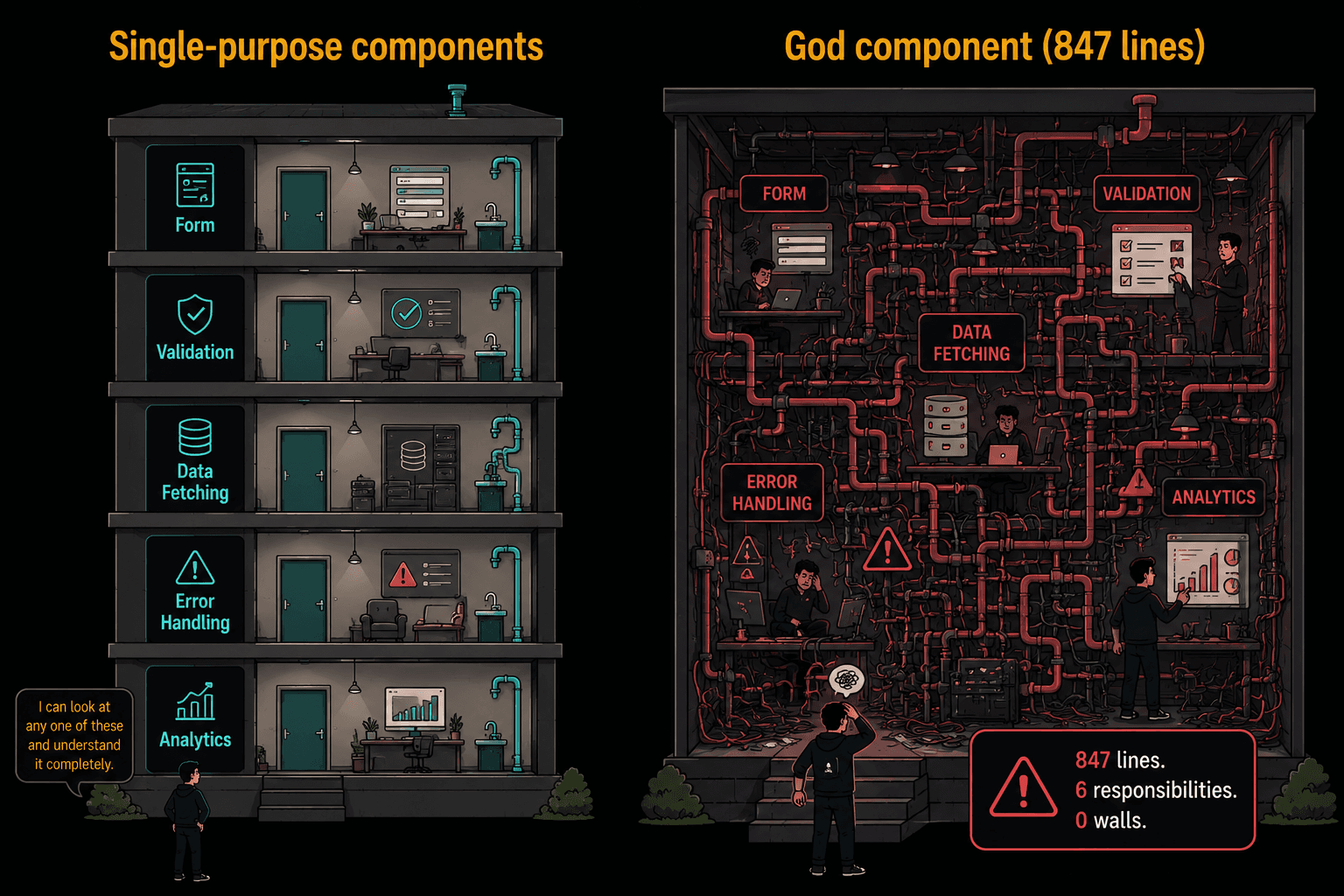
The problem isn't the line count itself. It's that 800-line files resist change. When everything is interconnected in one file, changing the validation logic requires understanding the data fetching, which is entangled with the conditional rendering, which depends on the form state. A simple bug fix becomes a 2-hour archaeology session.
The Fix
Extract by responsibility, not by visual component. The mistake most people make is extracting "the header part" and "the footer part" of a big component into sub-components. That's visual splitting, and the sub-components end up needing 15 props from the parent because the logic is still centralized.
Instead, extract by what the code does:
// Before: everything in one file
function UserDashboard() {
  // 95 lines of data fetching
  // 110 lines of validation
  // 85 lines of event handlers
  // 127 lines of JSX
}

// After: logic extracted into hooks, UI stays thin
function UserDashboard() {
  const { user, posts, isLoading } = useUserData(userId);
  const { values, errors, handleChange } = useProfileForm(user);
  const { handleSave, handleDelete } = useProfileActions(userId);

  if (isLoading) return <DashboardSkeleton />;

  return (
    <DashboardLayout>
      <ProfileForm values={values} errors={errors} onChange={handleChange} />
      <PostList posts={posts} onDelete={handleDelete} />
    </DashboardLayout>
  );
}
The dashboard component is now 15 lines. It composes hooks and components. Each hook is testable independently. Each component receives only the props it needs. A new developer can read the dashboard in 30 seconds and know exactly where to look for any specific behavior.
The rule of thumb: if you can't describe what a component does in one sentence, it does too much.
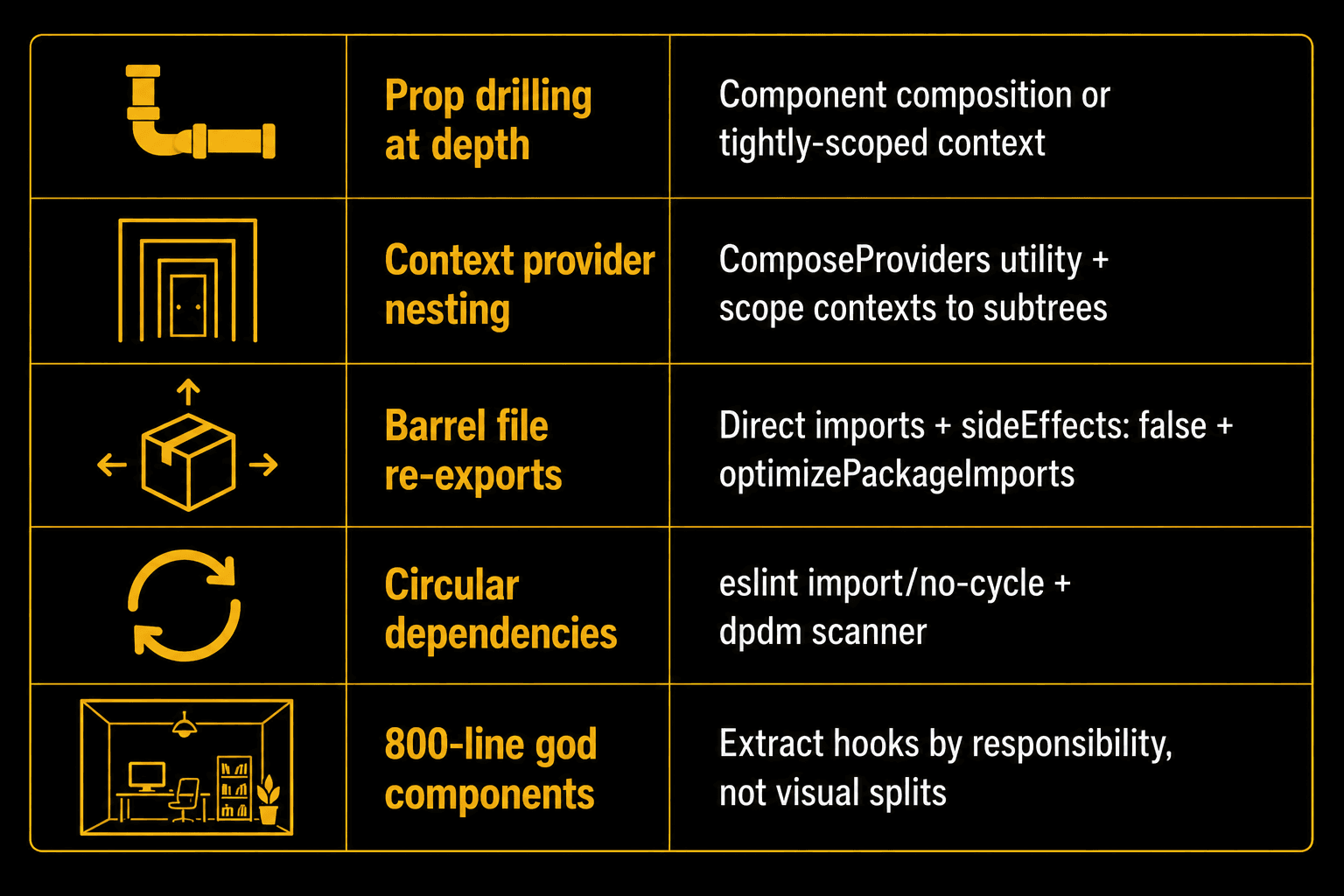
These aren't performance optimizations. They're structural decisions that determine whether your codebase stays maintainable as it grows:
- Prop drilling past 3 levels? Compose components at the top or add a scoped context. Don't pass props through components that don't use them.
- More than 4-5 context providers at the root? Use a ComposeProviders utility for readability. Push providers closer to their consumers.
- Barrel files (
index.ts) in your components or utils directory? Switch to direct imports. Check your bundle withnpx next-bundle-analyzerorsource-map-explorerto see the actual impact. - No circular dependency detection? Add
eslint-plugin-importwithimport/no-cycletoday. Rundpdmon your existing codebase and fix what it finds. - Any component file over 300 lines? Extract custom hooks by responsibility. The component should compose, not compute.
A three-story building can get away with shortcuts. A thirty-story one can't. The difference is whether you built the foundation knowing you'd need to go higher.
Fifth article in the Wise Coding series. Subscribe to Wise Coding Weekly for visual explainers in your inbox every week.
Wise Coding Weekly
Weekly visual explainers of frontend concepts.